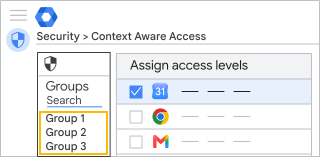
将情境感知访问权限与配置群组搭配使用

通过“配置群组”,您可以将不同的情境感知访问权限级别应用于群组(而不是组织部门)中的用户。配置群组可包含您企业中任意组织部门的用户。例如,您可以让一组承包商仅能通过您公司的网络访问 Gmail。

配置群组的运作方式

  • 配置群组可包含您组织中的任意用户。此外,您还可以创建配置群组,将其用作访问权限级别的容器,然后添加您的用户群组(嵌套群组)。
  • 一个用户可以属于多个配置群组,不像组织部门。您可以为配置群组设置优先级,用户所在的哪个群组具有最高优先级,系统就会为该用户应用哪个群组的设置。
  • 用户对某个应用的群组访问权限级别一律会覆盖该用户所在组织部门的访问权限级别。
  • 如果配置群组未指定对某个应用的访问权限级别,则该应用会使用相应用户所在组织部门的访问权限级别。

为应用情境感知访问权限而设计配置群组

配置群组在情境感知访问权限方面的运作方式,与其他 Google Workspace 设置略有不同。在设计群组和政策时,请参考以下信息和提示:

配置群组的选项

一般情况下,您先为组织部门指定访问权限级别,然后决定配置群组的自定义访问权限级别。例如,您可以设置“开放访问权限”或“取消访问权限”配置群组,以便快速对特定用户授予或限制访问权限。

通常情况下,您可以搭配使用不同的配置群组:

使用现有的用户群组

为用户组中的每个应用(例如 Gmail 或 Google 云端硬盘)设置访问权限级别。如果用户同时属于多个群组,您应当设置由哪个群组决定用户的设置(如下文中的优先级部分所述)。

在以下情况下,非常适合将访问权限级别直接应用于用户群组:

  • 测试情境感知访问权限。
  • 管理特定用户群组(例如 IT 员工或远程任务团队)的访问权限。
  • 管理组织的访问权限,其中的用户少于 50 人,或访问权限级别较少。在这种情况下,您无需创建更多用户组,只要为每个用户组微调设置即可。

基于访问权限级别创建配置群组

您也可以为群组分配访问权限级别。您可以创建一个配置群组,并为一个或多个应用分配访问权限级别,然后将您的用户群组添加为该配置群组的成员。

大型组织可能会发现,此方法非常适合管理访问权限群组政策和优先级(如下文所述)。

如何将优先级和访问权限级别搭配使用

如果用户属于多个配置群组,您可以设置由哪个配置群组优先决定用户的应用访问权限。

在 Google 管理控制台中,您必须先选择一个应用才能显示其对应的群组优先级列表。群组是按照优先级从排列的。新配置群组的优先级始终最低,且此类群组会被添加到配置群组列表的底部。

情境感知访问权限的优先级

用户所在的哪个群组具有最高优先级,系统就会为该用户应用哪个群组的应用设置。如果该群组未设置对特定应用的访问权限级别,则系统会为用户应用优先级次之的群组的访问权限级别,以此类推。

在管理控制台中,您可以查看哪个群组或组织部门决定了用户的应用访问权限级别。在下例中,群组云端硬盘安全性决定了用户对云端硬盘的访问权限。

用户的应用 访问权限级别 继承来源
Google 日历 公司网络 组织部门:销售
云端硬盘 公司网络、设备安全 群组:云端硬盘安全性
Gmail 设备安全 组织部门:销售
Google 保险柜 <无> <无>

您可以使用群组自定义针对每款应用的访问权限级别,以便实现精细控制。例如:

用户的应用 访问权限级别 继承来源
日历 公司网络 组织部门:销售
云端硬盘 公司网络、设备安全 群组:云端硬盘安全性
Gmail 设备安全、加拿大地区 群组:北美洲
保险柜 设备受限、公司网络 群组:保险柜调查员

将优先级应用于配置群组

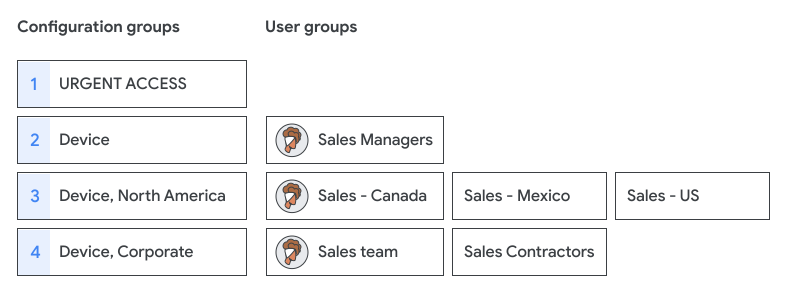
  • 考虑将重要或敏感的配置群组设为高优先级。例如,您可以将“紧急访问”群组设为最高优先级群组,它会覆盖任何限制访问权限的群组的设置。
  • 系统不会为用户的所有群组添加访问权限级别。在此示例中,用户属于 3 个用户群组,但只有最高优先级的配置群组“设备”设置了访问权限级别。
规划和设计配置群组

相比其他步骤,规划配置群组结构时可能需要花费更多时间反复进行验证。

命名和搜索群组

设置群组命名标准,以便更轻松地进行搜索、确定优先级,以及进行审核。例如,添加“caa”之类的前缀来表示情境感知配置群组。此外,在添加配置群组时,您还可以使用小数位来避免修改现有群组的名称。
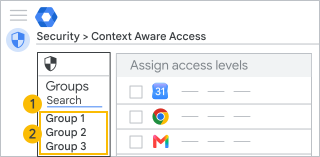
1. 按群组地址搜索
2. 查看群组列表
<ul>
  <li><b>Search for a group:</b> You might want to set up a naming standard that includes the setting name and priority number, for example:</li>

<blockquote>
<p>caa_p0.0_unrestricted_access@example.com<br>
  caa_p1.0_lockdown_access@example.com<br>
  caa_p3.0_Gmail_IP_Device@example.com<br>
  caa_p3.1_Gmail_IP@example.com</p>

<ul>
  <li><b>View the groups:</b> The Groups panel displays the <b>group name</b> (maximum of 37 characters) in the priority order. Pointing to a group shows the full name. For example:</li>

<blockquote>
<p>CAA p0.0 - Unrestricted access all apps<br>
  CAA p1.0 - Lockdown access<br>
  CAA p3.0 - Gmail IP corp &amp; device security<br>
  CAA p3.1 - Gmail IP corp</p>

<p><b>Ordering groups</b></p>

<p>To keep track of priority and settings:</p>

<ul>
  <li>You might place groups that apply to the fewest users or define critical policies (such as "Lockdown access" or "All access") at the highest priority.</li>
  <li>Consider priority in your group structure and watch for deeply nested groups, which might be challenging to trace to settings.</li>

<p><b>Creating groups</b></p>

<p>You must use groups created in the Admin console, Directory API, or Google Cloud Directory Sync. Groups created in Google Groups can't be used as configuration groups. (The Admin console doesn't show whether a group was created in Google Groups.)</p>

<p>You can manage the configuration group in any tool. You might set strict permissions to add or delete users, turn off posting to the group, or prevent users from leaving the group (available only in the Groups API).</p>

设置配置群组

准备工作:指定情境感知访问权限级别并创建配置群组(最好包含 1 至 2 个测试账号)。

第 1 步:应用配置群组

您需要拥有对群组、组织部门(顶级)和数据安全访问权限级别管理和规则管理的管理员权限。

  1. 在 Google 管理控制台中,依次前往“菜单”图标 然后 安全性 然后 访问权限和数据控件 然后 情境感知访问权限

    需要数据安全访问权限级别管理和规则管理权限以及 Admin API 群组和用户读取权限

  2. 点击分配访问权限级别以查看应用列表。
  3. 情境感知访问权限部分中,点击群组
  4. 选择相应选项:
    • 点击相应应用。系统会按照优先级顺序列出所有已为该应用分配访问权限级别的现有配置群组。
    • 点击搜索群组可查看所有群组的列表,而不仅仅是配置群组。您可以输入文本来过滤结果。
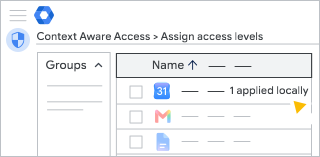
  5. 点击相应群组。应用表格列出了所有应用以及为其分配的访问权限级别。
    • 如果您没有找到所需群组,则该群组可能是通过 Google 群组创建的。您必须通过管理控制台、Directory API 或 Google Cloud Directory Sync 创建配置群组。
    • 添加配置群组时,请按照优先级从到低的顺序添加。当您为应用添加新的群组政策时,其优先级将设为最低。
  6. 点击一个或多个应用,然后点击分配
  7. 为群组中的应用选择访问权限级别,然后点击保存。默认情况下,系统不会为新群组分配访问权限级别。


    如果组织拥有多种类型的 Google Workspace 许可,则群组访问权限级别仅会应用于获得包含情境感知访问权限控制功能的 Google Workspace 版本的用户。

第 2 步:检查用户的访问权限级别

<div>
  <p>You need <a href="/admin/users/administrator-privilege-definitions" target="_blank">admin privileges</a> for Groups, Organizational Units (top-level), and <a href="/admin/users/administrator-privilege-definitions#Context_Aware_Access" target="_blank">Data Security Access level management and Rule management</a>.</p>

  <ol>
    <li>
      <div>


In the Google Admin console, go to Menu and then Security and then Access and data control and then Context-Aware Access.

Requires the Data security access level and rule management privileges and the Admin API groups and users read privileges.

</div>

  • 在管理控制台中,转到相应应用的设置页面。
  • 点击左上角的用户
  • 点击选择用户,然后输入用户的地址(而非名字)。
  • 选择要查看其应用设置的用户。继承自列会显示决定用户设置的配置群组或组织部门。
  • 将光标指向某个应用,然后点击查看以详细了解用户的访问权限级别。
  •   <p><b>Note</b>: When you view an organizational unit, the <b>Inherited</b> levels are based only on an organizational unit's setting, not on configuration groups.</p>
    

    移除配置群组

    <div>
      <p>You need <a href="/admin/users/administrator-privilege-definitions" target="_blank">admin privileges</a> for Groups, Organizational Units (top-level), and <a href="/admin/users/administrator-privilege-definitions#Context_Aware_Access" target="_blank">Data Security Access level management and Rule management</a>.</p>
    
      <ol>
        <li>
          <div>


    In the Google Admin console, go to Menu and then Security and then Access and data control and then Context-Aware Access.

    Requires the Data security access level and rule management privileges and the Admin API groups and users read privileges.

    </div>

  • 点击分配访问权限级别以查看应用列表。
  • 点击左侧的群组
  • 点击要移除的群组。
  • 首先,取消分配群组中所有应用的全部访问权限级别。在应用面板中,逐一检查各个应用,确保所有访问权限级别均已取消分配。
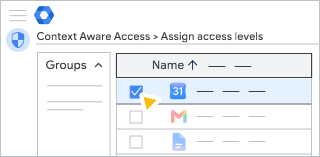
  • 点击分配
  • 点击全部取消选择
  • 点击保存
  • 相应配置群组不会再出现在“群组”列表中。 更改最长可能需要 24 小时生效,但通常会更快完成。了解详情

    修改配置群组

    <div>
      <p>You need <a href="/admin/users/administrator-privilege-definitions" target="_blank">admin privileges</a> for Groups, Organizational Units (top-level), and <a href="/admin/users/administrator-privilege-definitions#Context_Aware_Access" target="_blank">Data Security Access level management and Rule management</a>.</p>
    
      <ol>
        <li>
          <div>


    In the Google Admin console, go to Menu and then Security and then Access and data control and then Context-Aware Access.

    Requires the Data security access level and rule management privileges and the Admin API groups and users read privileges.

    </div>

  • 点击分配访问权限级别以查看应用列表。
  • 点击左侧的群组
  • 搜索要修改的群组。
  • 在右侧,选择要修改、添加或移除的应用。
  • 点击分配
  • 更新群组的访问权限级别分配情况。
  • 点击保存
  •   <p>
    
    Changes can take up to 24 hours but typically happen more quickly. Learn more</p>
    

    问题排查

    <div>
      <p><b>I don't see the configuration group in the Groups list</b></p>
    
      <ul>
        <li>The group may have been created in Google Groups. Try creating a group in the <a href="https://support.google.com/a/answer/33343">Admin console</a>.</li>
        <li>Search for the group's email address rather than the group's name.</li>
        <li>Try refreshing the setting page. 
    
    Changes can take up to 24 hours but typically happen more quickly. Learn more</li>
        <li>Check that you have <a href="/admin/users/make-a-user-an-admin" target="_blank">admin privileges</a> for Groups.</li>
    

      <p><b>A user doesn't have the correct access level</b></p>
    
      <ul>
        <li>Check a user's group membership. 
    
    Changes can take up to 24 hours but typically happen more quickly. Learn more</li>
        <li>Find the configuration group that's determining <a href="#step2">the user's settings</a>. If the user belongs to multiple configuration groups, you might need to change the group priority or user's group membership.</li>
        <li>The user may not have the product license for the feature. Context-Aware Access is available with specific editions of Google Workspace.</li>
        <li>If the user can't access an app, the app might be assigned a deleted access level. Check <a href="/admin/security/assign-context-aware-access-levels-to-apps" target="_blank">remove a deleted access level</a>.</li>
    

    在审核日志中查看更改

    <div>
      <p>Review these events in the <a href="/admin/reports/admin-log-events" target="_blank">Admin Audit log</a> for changes to configuration group settings:</p>
    
      <p><b>EVENT: Context Aware access level App-specific Assignments Change</b></p>
    
      <table class="nice-table">
        <tbody>
          <tr>
            <td>
            <p>Logs when you apply or remove a configuration group. The event uses the group name<i>,</i> so you might use a similar naming standard for both your group name and address.</p>
    
            <p>The data included in a group event:</p>
    
            <blockquote>
            <p>Access Level assignments have been changed from []<br>
              to [<b>access levels</b>]. (application_name: {<b>app</b>}, group_name: {<b>configuration group</b>})</p>
    

            <p>For example, you apply the configuration group <b>CAA.02 local access</b> to an app:</p>
    
            <blockquote>
            <p>Access Level assignments have been changed from [] to [<b>Company IP, Device</b>].<br>
              (application_name: {<b>GMAIL</b>}, group_name: {<b>CAA.02 local access}</b> </p>
    

            <p>When you remove the configuration group from an app:</p>
    
            <blockquote>
            <p>Access Level assignments have been changed from [<b>Company IP, Device</b>] to [].<br>
              (application_name: {<b>GMAIL</b>}, group_name: {<b>CAA.02 Local Access}</b> </p>
    

    了解组织部门和群组继承以及配置群组

    如果您在下级组织部门或群组更改了任何本地访问权限级别,则该下级组织部门或群组仅具有在本地生效的访问权限级别,不会继承上级组织的任何访问权限级别。

    如果您移除所有本地分配的访问权限级别,以恢复最初继承的访问权限级别,则下级组织部门仅具有继承的访问权限级别。

    以组织部门举例来说,如果在顶级组织部门为某应用分配了 3 个访问权限级别,即使下级组织部门不拥有本地分配的访问权限级别,这些访问权限级别将通过继承分配给下级组织部门中的同一个应用。如果您随后仅在下级组织部门中添加了访问权限级别,则只有这个新添加的访问权限级别会用于该下级组织部门。

    使用空政策来覆盖通过继承所分配的访问权限级别

    假设您不希望禁止下级组织部门中的用户访问应用,那么先不要分配任何访问权限级别,请创建名为“Any”的访问权限级别,在其中添加 2 个 IP 子网条件,并使用 OR 连接这两个条件:

    • IPv4 子网范围 0.0.0.0/0
    • IPv6 子网范围 0::/0

    这样一来,组织中的用户就可以通过任意 IPv4 或 IPv6 地址获得访问权限了。

    使用配置群组来覆盖所分配的访问权限级别

    您可以使用配置群组来为用户群组而不是组织部门分配访问权限级别。用户的群组访问权限级别一律会覆盖其所在组织部门的访问权限级别。您可以将您账号中任意组织部门的用户添加到配置群组中。

    举例来说,某位用户既属于某个组织部门,也属于 Group1。此组织部门是上级组织部门,对 Gmail 和 Google 日历拥有指定的访问权限级别 X。Group1 对 Gmail 没有任何访问权限级别,但对 Google 日历拥有访问权限级别 Y。在这种情况下,该用户对 Gmail 拥有访问权限级别 X(通过继承获得),对 Google 日历拥有访问权限级别 Y(通过覆盖本地政策获得)。