

По умолчанию все пользователи и устройства входят в одно организационное подразделение, которое называется организационным подразделением верхнего уровня. К нему применяются настройки, выбранные в консоли администратора Google.
Как применить настройки к группе пользователей или устройств
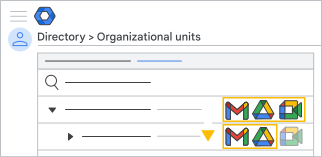 Чтобы задать отдельные настройки для группы пользователей или устройств, включите их в дочернее организационное подразделение (например, создайте подразделения "Финансы" или "Отдел кадров"). Выбранные настройки будут действовать для всех пользователей и устройств в этом подразделении. Чтобы дочернее организационное подразделение не наследовало настройки родительского, примените к нему любые специфические для него настройки.
- Пример. Сервисы Gmail, Google Meet и Google Диск включены для пользователей организационного подразделения верхнего уровня. Для пользователей в дочернем организационном подразделении Gmail и Диск остаются включенными (наследуются), а Meet отключается.
- Рекомендация. Создайте отдельные организационные подразделения для пользователей и устройств. Так вы сможете настроить необходимые параметры для управляемых устройств и пользователей.
Настройте структуру организации
В подразделении верхнего уровня вы можете создать любое количество дочерних подразделений на одном или нескольких уровнях. Изменение настроек на более высоком уровне влечет за собой изменение настроек для всех дочерних подразделений, которые наследуют эти настройки. Пользовательские настройки при этом остаются без изменений.
Чтобы начать:
- Создайте организационные подразделения с пользователями или устройствами Chrome.
- Для каждого из подразделений вы можете:
- Как включать или отключать сервисы для пользователей
- изменять настройки сервисов, например правила общего доступа к Диску;
- настраивать правила для устройств Chrome.
Как применить настройки к одному пользователю или устройству
Чтобы изменить параметры для одного пользователя или устройства, создайте для него отдельное организационное подразделение. Пользователь или устройство могут принадлежать только к одному организационному подразделению и при этом наследуют его настройки.
У вас несколько доменов?
Вы можете добавлять в организационное подразделение пользователей из разных доменов. Чтобы изменить настройки для отдельного домена, создайте организационное подразделение только для его пользователей.
Варианты для крупных организаций
Если у вас много пользователей или вы синхронизируете каталог LDAP, возможно, вы захотите сделать исключения для некоторых групп пользователей независимо от их организационного подразделения.
У вас есть два варианта:
Группы конфигурации (для настройки параметров сервисов). Например, с помощью организационных подразделений можно запретить сотрудникам нескольких отделов предоставлять внешний доступ к файлам на Диске, а затем разрешить это делать только отдельным пользователям в каждом отделе, добавив их в группу конфигурации.
Подробнее о том, как настраивать сервисы с помощью групп конфигурации…
Группы доступа (для настройки доступа к сервисам). Например, можно отключить YouTube для сотрудников нескольких отделов, используя организационные подразделения, а затем включить этот сервис для отдельных пользователей в каждом отделе, добавив их в группу доступа.
Подробнее о том, как настроить доступ к сервисам с помощью групп доступа…