

Deze functie is beschikbaar met Google Workspace.
Je kunt alledaagse woorden gebruiken om te beschrijven wat je zoekt met Google Cloud Search. Je kunt bijvoorbeeld zoeken naar sheets from joe smith last week om een spreadsheet te vinden die je collega Joe een week geleden met je heeft gedeeld. Zoeken is voorlopig alleen mogelijk in het Engels.
Computer
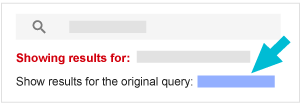
Cloud Search interpreteert uw zoekopdracht met behulp van zoekoperators om u de meest relevante resultaten te geven. Als Cloud Search uw zoekopdracht niet interpreteert zoals u had verwacht, klikt u bovenaan de pagina op de link ' Resultaten voor de oorspronkelijke zoekopdracht weergeven' .
Voor snelle antwoorden verschijnt de informatie op een kaart bovenaan uw zoekresultaten. Als u bijvoorbeeld zoekt naar audrey's phone number , krijgt u een antwoordkaart met de profielinformatie van uw collega met de naam Audrey. Als er meerdere personen met die naam zijn, kunt u door de resultaten scrollen of op 'Alles bekijken' klikken en vervolgens op de juiste persoon klikken om hun profielpagina te openen.
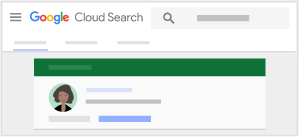
Let op : U ontvangt contact- en profielinformatie alleen als uw organisatie deze gegevens aan gebruikersaccounts toevoegt.
Vind inhoud van uw Google Workspace-services
- Meld u aan bij Cloud Search via cloudsearch.google.com .
Als u niet kunt inloggen, beschikt uw account niet over Cloud Search. Meer informatie
- Doe een zoekopdracht, bijvoorbeeld naar
slides audrey sent last month. - Als de interpretatie niet helemaal klopt, klik dan op de link ' Resultaten voor de oorspronkelijke zoekopdracht weergeven '.
Vind contactgegevens van mensen op het werk
- Meld u aan bij Cloud Search via cloudsearch.google.com .
Als u niet kunt inloggen, beschikt uw account niet over Cloud Search. Meer informatie
- Zoek bijvoorbeeld naar
audrey's phone number. - Klik op de resultatenkaart van de persoon om hun profielinformatie te openen. Als er meerdere personen met dezelfde naam zijn, blader dan door de resultaten of klik op 'Alles bekijken' . Klik op de naam van de juiste persoon om hun profielpagina te openen.
- Om contact op te nemen met een persoon of een afspraak met die persoon te plannen, klikt u op de gewenste actie:
- Om een e-mail te verzenden, klikt u op E-mail.
 of het e-mailadres van de persoon.
 - Om een vergadering in te plannen, klikt u op 'Inplannen'.
 .
. - Om te chatten, klik op Hangout.
 .
. - Om een videogesprek te starten, klikt u op Videogesprek.
 .
.
- Om een e-mail te verzenden, klikt u op E-mail.
Android
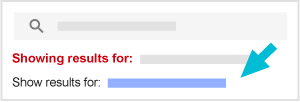
Cloud Search interpreteert uw zoekopdracht met behulp van zoekoperators om u de meest relevante resultaten te geven. Als Cloud Search uw zoekopdracht niet interpreteert zoals u verwacht, tik dan bovenaan de pagina op de link ' Resultaten weergeven voor '.
Voor snelle antwoorden verschijnt de informatie op een kaart bovenaan je zoekresultaten. Als je bijvoorbeeld zoekt naar audrey's phone number , krijg je een antwoordkaart met de profielinformatie van je collega met de naam Audrey. Als er meer dan één persoon met die naam is, veeg dan door de resultaten of tik op ' Alles bekijken' en tik vervolgens op de juiste persoon om de profielpagina te openen.
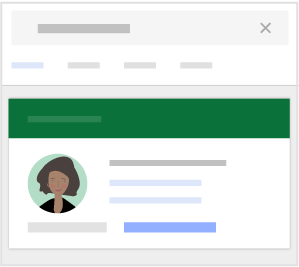
Let op : U ontvangt contact- en profielinformatie alleen als uw organisatie deze gegevens aan gebruikersaccounts toevoegt.
Vind inhoud van uw Google Workspace-services
- Open de Cloud Search-app.
 .
. - Doe een zoekopdracht, bijvoorbeeld naar
slides audrey sent last month. - Als de interpretatie niet is wat je bedoelde, tik dan op de link ' Resultaten weergeven '.
Vind contactgegevens van mensen op het werk
- Open de Cloud Search-app. .
- Zoek bijvoorbeeld naar
audrey's phone number. - Tik op de resultatenkaart van de persoon om hun profielinformatie te openen. Als er meerdere personen met dezelfde naam zijn, veeg dan door de resultaten of tik op 'Alles bekijken' . Tik op de naam van de juiste persoon om hun profielpagina te openen.
- Om contact op te nemen met een persoon of een afspraak met die persoon in te plannen, tik je op de gewenste actie:
- Om een e-mail te verzenden, tik je op E-mail. of het e-mailadres van de persoon.
- Om te chatten, tik je op Hangout. .
- Om te bellen, tik op Bellen
 of het telefoonnummer van de persoon.
 - Om een vergadering in te plannen, tik je op 'Plannen'. .
- Om een e-mail te verzenden, tik je op E-mail.
iPhone en iPad
Cloud Search interpreteert uw zoekopdracht met behulp van zoekoperators om u de meest relevante resultaten te geven. Als Cloud Search uw zoekopdracht niet interpreteert zoals u verwacht, tik dan bovenaan de pagina op de link ' Resultaten weergeven voor '.
Voor snelle antwoorden verschijnt de informatie op een kaart bovenaan je zoekresultaten. Als je bijvoorbeeld zoekt naar audrey's phone number , krijg je een antwoordkaart met de profielinformatie van je collega met de naam Audrey. Als er meer dan één persoon met die naam is, veeg dan door de resultaten of tik op ' Alles bekijken' en tik vervolgens op de juiste persoon om de profielpagina te openen.
Let op : U ontvangt contact- en profielinformatie alleen als uw organisatie deze gegevens aan gebruikersaccounts toevoegt.
Vind inhoud van uw Google Workspace-services
- Open de Cloud Search-app. .
- Doe een zoekopdracht, bijvoorbeeld naar
slides audrey sent last month. - Als de interpretatie niet is wat je bedoelde, tik dan op de link ' Resultaten weergeven '.
Vind contactgegevens van mensen op het werk
- Open de Cloud Search-app. .
- Zoek bijvoorbeeld naar
audrey's phone number. - Tik op de resultatenkaart van de persoon om hun profielinformatie te openen. Als er meerdere personen met dezelfde naam zijn, veeg dan door de resultaten of tik op 'Alles bekijken' . Tik op de naam van de juiste persoon om hun profielpagina te openen.
- Om contact op te nemen met een persoon of een afspraak met die persoon in te plannen, tik je op de gewenste actie:
- Om een e-mail te verzenden, tik je op E-mail. of het e-mailadres van de persoon.
- Om te chatten, tik je op Hangout. .
- Om te bellen, tik op Bellen of het telefoonnummer van de persoon.
- Om een vergadering in te plannen, tik je op 'Plannen'. .
- Om een e-mail te verzenden, tik je op E-mail.
Gebruik gangbare uitdrukkingen.
Je kunt zinnen gebruiken die betrekking hebben op personen, documenten, Google-services en meer. Hier zijn een paar voorbeelden.
Mensen
| Veelgebruikte zoekwoorden | Voorbeelden van zoekopdrachten |
|---|---|
| voornaam , achternaam , gebruikersnaam e-mailadres adres telefoonnummer functietitel manager rapporteert aan informatie over | joe smith's email |
Je kunt alleen zoeken op profielinformatie die door jouw organisatie is ingesteld. Als je niet kunt zoeken op functietitel, telefoonnummer of andere profielinformatie, vraag dan je beheerder om de gebruikersprofielen bij te werken .
Gmail
| Veelgebruikte zoekwoorden | Voorbeelden van zoekopdrachten |
|---|---|
| over van ontvangen verstuurd voor mij onderwerp | mail about sales from audrey |
Inhoud/Bron
| Veelgebruikte zoekwoorden | Voorbeelden van zoekopdrachten |
|---|---|
| bestanden 1 documenten vellen dia's | slides from mary moore last month |
| van eigendom van | |
| onlangs vorige week vorig jaar vóór datum 2 na datum |
1. Omvat alle bestandstypen, zowel in Drive als in bijlagen.
2. Wanneer u de operatoren ' voor' of 'na' in een query gebruikt, kunnen uw resultaten inhoud bevatten die de datum 'voor' of 'na' bevat, vanwege tijdzoneverschillen.
Documenten delen
| Veelgebruikte zoekwoorden | Voorbeelden van zoekopdrachten |
|---|---|
| gedeeld gedeeld maar niet bekeken vermelding 1 vermeldingen die niet aan bod komen 2 aandacht nodig 3 | documents that mention me recently |
1. Documenten die met u zijn gedeeld en waarin u wordt genoemd in een opmerking die u wel of niet hebt bekeken, of waarop u hebt gereageerd.
2 documenten die met u zijn gedeeld en waarin u wordt genoemd in een opmerking waarop u niet hebt gereageerd.
3 documenten die met u zijn gedeeld maar die u nog niet hebt bekeken, of waarin u wordt genoemd in een opmerking waarop u nog niet hebt gereageerd.