

您可以透過「配置群組」,將情境感知存取權層級套用至一群使用者 (而非機構單位)。您公司中任何組織單位的使用者都可以加入配置群組。舉例來說,您可以設定讓承包商團隊只能透過貴公司的網路存取 Gmail。
配置群組的運作方式
- 您可以在配置群組中加入貴機構的任何使用者,也可以將建立的配置群組當做存取層級的容器,然後在其中新增您的使用者群組 (巢狀群組)。
- 與機構單位不同,使用者可同時屬於多個配置群組。您可以針對使用者所屬的配置群組設定優先順序,讓使用者套用其中優先順序最高的群組設定。
- 使用者的應用程式群組存取層級 「一律」會覆寫其所屬機構單位的存取層級。
- 如果配置群組沒有替應用程式指定存取層級,應用程式便會套用使用者所屬組織單位所設定的存取層級。
針對情境感知存取權設計配置群組
配置群組在情境感知存取權方面的運作方式,與其他 Google Workspace 設定稍有不同。設計群組和政策時,請遵循以下資訊和提示:
配置群組選項
您通常應該先為機構單位定義存取層級,再為配置群組決定自訂存取層級。舉例來說,您可以設定具備「開放存取權」或「鎖定存取權」的配置群組,以便快速授予或限制特定使用者的存取權。
一般而言,您需要合併運用多個配置群組:
使用現有的使用者群組
您可以在使用者群組中為各個應用程式 (例如 Gmail 或 Google 雲端硬碟) 設定存取層級;如果使用者同時屬於多個群組,您還可以決定要讓使用者套用哪個群組的設定 (詳情請參閱後續的優先順序一節)。
在下列情況中,建議您將存取層級直接套用至使用者群組:
- 測試情境感知存取權。
- 管理特定使用者群組的存取權,例如 IT 員工或遠端作業團隊。
- 為使用者數量少於 50 名或只有少數存取層級的機構管理存取權。您便不需要建立更多群組,且可以為各個使用者群組精確調整設定。
或者,您也可以將存取層級指派給群組。您可以建立配置群組,並為一或多個應用程式指派存取層級,然後將使用者群組新增為配置群組的成員。
對於較大型的機構而言,這種做法有助於管理存取群組政策及優先順序 (如下所述)。
優先順序對存取層級的影響
如果使用者同時屬於多個配置群組,您可以設定要讓使用者優先套用哪個配置群組的應用程式存取權。
在 Google 管理控制台中,您必須先選取應用程式,才能顯示對應的群組優先順序清單。系統會依優先順序最高到最低的順序列出群組。最新配置群組的優先順序最低,且會新增至配置群組清單的底部。
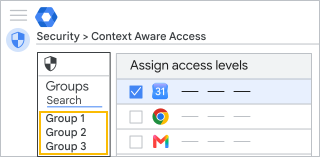
情境感知存取權的優先順序
系統會根據使用者所屬的配置群組,為使用者套用其中優先順序最高的群組應用程式設定;如果該群組並未針對特定應用程式設定存取層級,系統便會為使用者套用優先順序次高的群組所指定的存取層級,以此類推。
您可以在管理控制台中查看使用者的應用程式套用了哪個群組或組織單位的存取層級。在下方的範例中,使用者的雲端硬碟套用了「雲端硬碟安全性」群組所設定的存取權。
| 使用者的應用程式 | 存取層級 | 沿用來源 |
|---|---|---|
 Google 日曆 Google 日曆 |
公司網路 | 機構單位:銷售 |
 雲端硬碟 雲端硬碟 |
公司網路、裝置安全性 | 群組:雲端硬碟安全性 |
 Gmail Gmail |
裝置安全性 | 機構單位:銷售 |
 Google 保管箱 Google 保管箱 |
<無> | <無> |
如要使用精細的控制項,您可以使用群組為每個應用程式自訂存取層級,如下所示:
| 使用者的應用程式 | 存取層級 | 沿用來源 |
|---|---|---|
| 日曆 |
公司網路 | 機構單位:銷售 |
| 雲端硬碟 |
公司網路、裝置安全性 | 群組:雲端硬碟安全性 |
| Gmail |
裝置安全性、加拿大地區 | 群組:北美洲 |
| 保管箱 |
受限裝置、公司網路 | 群組:保管箱審查者 |
為配置群組設定優先順序
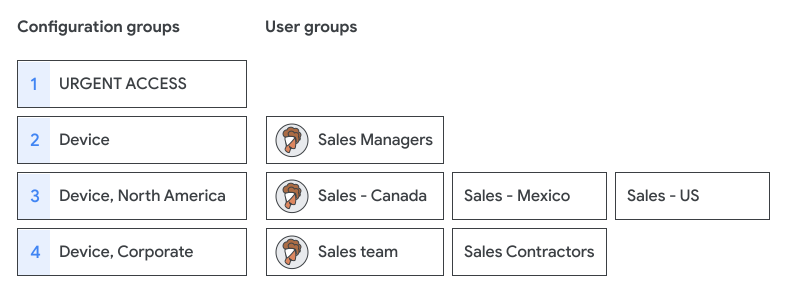
- 建議您將重要或敏感的配置群組設為高度優先。舉例來說,貴機構優先順序最高的群組或許是「緊急存取」群組,則其可覆寫任何限制存取權的群組。
-
系統不會將存取層級套用至使用者的所有群組。在下列範例中,這名使用者同時屬於 3 個使用者群組,但只會套用優先順序最高的「裝置」配置群組所設定的存取層級。
規劃及設計配置群組
規劃配置群組結構可能是最耗時費神的步驟。
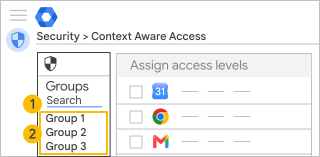
為群組命名及搜尋群組
設定群組命名標準能更方便您日後搜尋所需群組、為群組設定優先順序,以及進行稽核。舉例來說,您可以加上「caa」等前置字元,藉此標明情境感知配置群組。此外,新增配置群組時可使用小數,以免更動到現有的群組名稱。
 |
|
 依群組地址搜尋
 查看群組清單
- 搜尋群組:建議您在設定命名標準時,納入設定名稱和優先順序編號,例如:
caa_p0.0_unrestricted_access@example.com
caa_p1.0_lockdown_access@example.com
caa_p3.0_Gmail_IP_Device@example.com
caa_p3.1_Gmail_IP@example.com
- 查看群組:「群組」面板會按照優先順序顯示群組名稱 (最多顯示 37 個字元)。只要將滑鼠游標指向群組,即可看到完整的群組名稱。例如:
CAA p0.0 - Unrestricted access all apps
CAA p1.0 - Lockdown access
CAA p3.0 - Gmail IP corp & device security
CAA p3.1 - Gmail IP corp
為群組安排優先順序
如何追蹤優先順序和設定:
- 建議您將套用人數最少的群組或用於定義重大政策 (例如「鎖定存取權」或「所有存取權」) 的群組設定為最優先。
- 請謹慎設定群組結構的優先順序並注意巢狀層級過多的群組,因為這可能會增加追蹤設定的難度。
建立群組
您必須使用透過管理控制台、Directory API 或 Google Cloud Directory Sync 建立的群組。在 Google 網路論壇中建立的群組不能做為配置群組 (管理控制台不會顯示群組是否透過 Google 網路論壇建立)。
您可在任何工具中管理配置群組。也可以針對新增/刪除使用者的操作設定嚴格權限、禁止使用者在群組中張貼文章,或禁止使用者退出群組 (僅適用於 Groups API)。
設定配置群組
事前準備:定義情境感知存取權層級,並建立配置群組 (最好包含 1 至 2 個測試帳戶)。
步驟 1:套用配置群組
您必須具備群組、頂層機構單位、資料安全性存取層級管理及規則管理的管理員權限才能執行這個步驟。
-
在 Google 管理控制台中,依序點選「選單」圖示

 「安全性」
「安全性」 「存取權與資料控管」「情境感知存取權」。
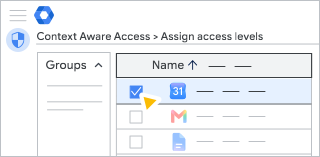
 - 按一下「指派存取層級」即可查看應用程式清單。
- 在「情境感知存取權」部分中,點選「群組」。
- 選擇下列其中一種做法:
- 按一下所需應用程式。系統會按照優先順序,列出任何針對您的應用程式獲派存取層級的現有配置群組。
- 按一下「搜尋群組」,即可查看所有群組的清單,而不只有配置群組。您可以輸入文字來篩選結果。
- 按一下目標群組。 應用程式表格會列出所有應用程式,以及每個應用程式的存取層級指派情形。
- 如果找不到所需群組,表示該群組可能是透過 Google 網路論壇建立。您必須在管理控制台、Directory API 或 Google Cloud Directory Sync 中建立配置群組。
- 建議您依照優先順序由高至低新增配置群組,為應用程式新增群組政策時,系統會將其優先順序設為最低。
- 點選一或多個應用程式,然後按一下「指派」。
- 為群組中的應用程式選取存取層級,然後按一下「儲存」。根據預設,新群組沒有任何指派的存取層級。
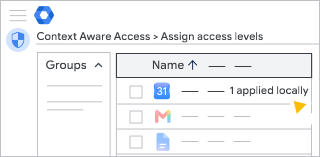
擁有多種類型的 Google Workspace 授權的機構:群組存取層級僅適用於獲派了包含情境感知存取權控管的 Google Workspace 版本的使用者。
步驟 2:查看使用者的存取層級
您必須具備群組、頂層機構單位、資料安全性存取層級管理及規則管理的管理員權限才能執行這項操作。
-
在 Google 管理控制台中,依序點選「選單」圖示
「安全性」「存取權與資料控管」「情境感知存取權」。 - 在管理控制台中,前往目標應用程式的設定頁面。
- 按一下左上方的「使用者」。
- 按一下「選取一位使用者」,然後輸入使用者的地址 (而非名稱)。
- 選取該使用者即可查看其應用程式設定。「沿用來源」資料欄會顯示使用者套用的設定所來自的配置群組或機構單位。
- 將滑鼠游標指向任一應用程式並點選「查看」,即可取得該使用者的存取層級詳細資料。
注意:您查看機構單位時,其沿用的層級資料是來自機構單位的設定,而非配置群組。
移除設定群組
您必須具備群組、頂層機構單位、資料安全性存取層級管理及規則管理的管理員權限才能執行這項操作。
-
在 Google 管理控制台中,依序點選「選單」圖示
「安全性」「存取權與資料控管」「情境感知存取權」。 - 按一下「指派存取層級」即可查看應用程式清單。
- 按一下左側的 [群組]。
- 按一下想移除的群組。
- 首先,請取消指派該群組中所有應用程式的全部存取層級。在「應用程式」面板中逐一檢查每個應用程式,確認所有存取層級皆已取消指派。
- 按一下「指派」。
- 按一下「取消勾選所有方塊」。
- 按一下「儲存」。
編輯配置群組
您必須具備群組、頂層機構單位、資料安全性存取層級管理及規則管理的管理員權限才能執行這項操作。
-
在 Google 管理控制台中,依序點選「選單」圖示
「安全性」「存取權與資料控管」「情境感知存取權」。 - 按一下「指派存取層級」即可查看應用程式清單。
- 按一下左側的 [群組]。
- 搜尋要編輯的群組。
- 在右側選取想編輯、新增或移除的應用程式。
- 按一下「指派」。
- 更新群組的層級指派情況。
- 按一下「儲存」。
疑難排解
我在「群組」清單中沒有看到配置群組
- 該群組可能是透過 Google 網路論壇所建立,請嘗試透過管理控制台建立群組。
- 請搜尋群組的電子郵件地址,不要搜尋群組名稱。
- 請嘗試重新整理設定頁面。變更最多需要 24 小時才會生效,但通常不會這麼久。瞭解詳情
- 確認您是否具備網路論壇的管理員權限。
使用者的存取層級有誤
- 檢查使用者的群組成員資格。 變更最多需要 24 小時才會生效,但通常不會這麼久。瞭解詳情
- 找出該使用者設定取決於哪個配置群組。如果使用者同時屬於多個配置群組,您可能需要變更群組優先順序或使用者的群組成員資格。
- 使用者可能沒有該功能的產品授權。情境感知存取權僅適用於特定 Google Workspace 版本。
- 如果使用者無法存取特定應用程式,可能表示先前指派給該應用程式的存取層級已遭到刪除。請參閱移除已刪除的存取層級。
在稽核記錄中檢視變更
您可以在管理員稽核記錄中查看下列事件,瞭解配置群組設定發生了哪些異動:
事件:情境感知存取權層級的應用程式專屬指派情況有所變更
|
在您套用或移除配置群組時留下的記錄。這個事件會使用群組名稱,因此建議您的群組名稱和位址使用類似的命名標準。 群組事件中包含的資料:
舉例來說,如果您將 CAA.02 local access 配置群組套用至應用程式:
從應用程式中移除配置群組時:
|
瞭解機構單位、群組沿用機制和配置群組
如果您在子組織單位或群組中做出任何本地存取層級變更,子組織中就只會套用這些本地存取層級,而不會沿用上層組織的任何存取層級。
如果您移除所有本地指派的存取層級,藉此還原原先沿用的存取層級,子組織單位就會只有原先沿用的存取層級。
舉例來說,假設頂層組織單位中有 3 個指派給應用程式的存取層級,而子組織單位沒有本地指派的存取層級,那麼頂層組織單位的存取層級也會透過沿用設定指派給子組織單位中的相同應用程式。如果您之後只在子組織單位中新增存取層級,子組織單位就只會套用這個存取層級。
運用零值政策覆寫沿用的存取層級
假設您不想封鎖子機構單位中任何使用者的存取權,也就是不指派存取層級,您可以建立進階運算式為 true 的存取層級。詳情請參閱「定義存取層級:進階模式」。
透過配置群組覆寫存取層級的指派設定
您可以透過「配置群組」,為一群使用者 (而非機構單位) 指派存取層級。使用者的群組存取層級一律會覆寫其所屬組織單位的存取層級。只要是您帳戶中的使用者,無論所屬組織單位為何,都可以加入這類群組。
舉例來說,使用者隸屬於某個機構單位和群組 1。這裡的組織單位稱為 ParentOU,已為 Gmail 和 Google 日曆指派存取層級 X。群組 1 的使用者沒有獲派 Gmail 的存取層級。 但獲派 Google 日曆的存取層級 Y。在這種情況下,系統會為使用者指派 Gmail 的存取層級 X (沿用上層設定),以及 Google 日曆的存取層級 Y (覆寫本地政策)。