

Сейчас самое время перевести подписки ваших клиентов на G Suite Basic и G Suite Business в Google Workspace. Начиная с 1 февраля 2023 года, Google автоматически переведет ваших клиентов, как только они получат на это право.
В этой статье:
- Управляйте уведомлениями для ваших клиентов.
- Используйте консоль партнерских продаж для перевода подписок G Suite.
- Используйте API для реселлеров, чтобы перевести подписки G Suite на новый сервер.
- Ознакомьтесь с часто задаваемыми вопросами о переходе.
- Выберите версию Google Workspace
Управляйте уведомлениями для ваших клиентов.
Ваши клиенты получают уведомления по электронной почте и в консоли администратора Google до и после автоматического перехода Google на Google Workspace. Если вы не хотите, чтобы ваши клиенты получали эти уведомления:
- Войдите в консоль партнерских продаж .
- Вверху нажмите «Меню».

 Настройки
  .
. - На странице «Информация об учетной записи» снимите флажок « Разрешить Google уведомлять клиентов о автоматическом переходе из G Suite в Google Workspace» .
- Нажмите «Обновить» .
Используйте консоль партнерских продаж для перевода подписок G Suite.
Для перевода клиента на новый тарифный план вы можете изменить его подписку на G Suite на подписку на Google Workspace в консоли партнерских продаж.
Что вам нужно знать о переходах
- Для перехода на Google Workspace Business количество лицензий в базовых и бизнес-подписках G Suite вашего клиента должно составлять не более 300. Если у клиента более 300 пользователей, ему необходимо перейти на Google Workspace Enterprise.
- Все пользователи в учетной записи клиента получают одинаковую подписку. Например, вы не можете перевести одних пользователей на Business Plus, оставив других на версии Business Standard. Если у клиента несколько версий G Suite (лицензирование с частичным доменным использованием), обратитесь за помощью к партнерам Google по продажам.
- Любые скидки на G Suite, которые вы получаете в настоящее время, не применяются после перехода клиента на подписку Google Workspace.
- Вашим клиентам с подписками G Suite Archived User необходимо перейти на подписку Archived User, соответствующую их подписке Google Workspace, при переходе. Узнайте, как переключиться на версию Archived User .
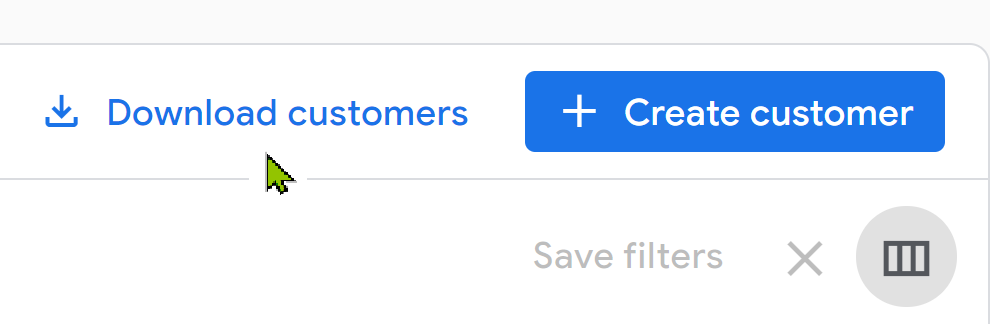
Совет : Чтобы получить список ваших клиентов G Suite, перейдите в консоль партнерских продаж. На странице «Клиенты» нажмите «Загрузить клиентов». Для получения CSV-файла со списком всех клиентов и их подписками, выполните фильтрацию по активным подпискам G Suite Basic и G Suite Business.
Как перевести отдельную подписку G Suite в консоли партнерских продаж
Перевод подписки G Suite на новый сервер
- Войдите в консоль партнерских продаж .
- На странице «Клиенты» нажмите на имя клиента.
- Выберите подписку G Suite Basic или G Suite Business.
- Нажмите «Понизить уровень подписки» (отображается только для подписок G Suite Business) или «Повысить уровень подписки» .
Примечание : Не выбирайте «Изменить тарифный план» . Скидки применяются только к новым заказам Google Workspace.
- Выберите версию Google Workspace Business или Enterprise.
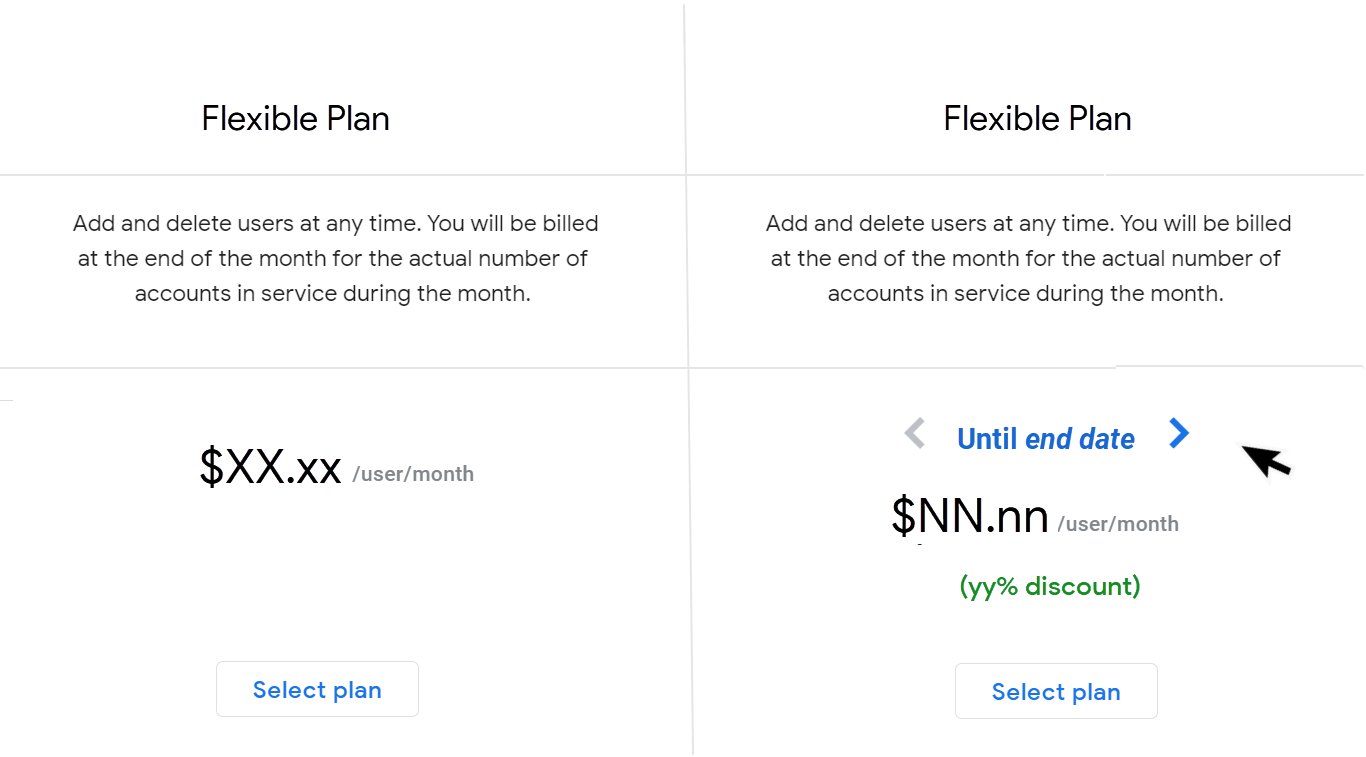
- Ознакомьтесь с тарифными планами и нажмите «Выбрать план» .
Чтобы посмотреть цены после окончания периода действия скидки, нажмите на дату его окончания.
Как перевести несколько подписок G Suite одновременно в консоли партнерских продаж.
Что нужно знать о пакетных переходах
- Невозможно осуществить массовый перевод клиентов со следующими типами подписок:
- Для перехода на офлайн-подписку свяжитесь с отделом продаж Google.
- Годовой план (ежегодная оплата) подписки
- Архивированные пользовательские подписки
- Подписки G Suite Lite
- Несколько подписок на G Suite или Google Workspace
- За один раз можно перевести до 300 подписок.
- Если в подписке G Suite клиента установлено ограничение на количество лицензий более 300, но количество назначенных лицензий меньше 300, мы корректируем это ограничение до 300 при переходе на рекомендуемую версию Google Workspace Business.
- При массовом переходе на более высокие тарифные планы вы имеете право на получение скидок. Google автоматически применяет эти скидки от вашего имени.
Массовый переход на подписки G Suite
- Войдите в консоль партнерских продаж .
- В левой панели нажмите «Переход на G Suite» .
Вы получите список подписок G Suite Basic и G Suite Business, которые в настоящее время доступны для массового перехода.
- Выберите подписки, которые вы хотите перевести.
Выбирая массовый переход, вы соглашаетесь перевести клиента на рекомендованную Google подписку и тарифный план. Если вы не согласны с этими рекомендациями, нажмите кнопку «Индивидуальный переход» и переведите подписку отдельно.
- В правом верхнем углу нажмите «Переход выбран» .
- Нажмите « Начать переход» .
Примечания:
- Процесс массового переноса данных может занять некоторое время. После начала процесса его нельзя прервать, пока не будут обработаны все переносы.
- В течение этого времени вы не можете инициировать дополнительные массовые переводы.
- После завершения процесса перехода вы сможете просмотреть журнал успешных и неудачных попыток.
- Подписки, которые не удалось перевести, по-прежнему отображаются в списке подписок G Suite. Вы можете повторить эти переводы.
Используйте API для реселлеров, чтобы перевести подписки G Suite на новый сервер.
Примечание : API Channel Services не поддерживает коды предложений. Для перевода подписок G Suite используйте API для реселлеров или выберите подходящее предложение с помощью API Channel Services.
При обновлении подписки клиента на G Suite до подписки на Google Workspace:
- Все пользователи в учетной записи клиента получают одинаковую подписку. Например, нельзя перевести одних пользователей на версию Business Plus, оставив других на версии Business Standard.
- Любые скидки на тарифы G Suite, которые вы получаете в настоящее время, не применяются после смены подписки клиентом.
- Архивированные подписки пользователей G Suite перенаправляются в архивированные подписки пользователей Google Workspace (с сохранением той же функциональности). Никаких действий не требуется.
Для получения информации о скидках при переходе на партнерский сайт посетите портал Partner Advantage.
Как перевести подписку G Suite с помощью API для реселлеров
API для реселлеров использует промокод для применения скидки к подпискам G Suite при переходе на Google Workspace.
Для получения дополнительной информации о промокодах войдите в партнерский портал Google Cloud, чтобы посмотреть вебинар Google Workspace «Переход с G Suite на Google Workspace».
Код предложения ( dealCode ) позволяет разблокировать специальное предложение, передав строку с кодом предложения вместе с вызовом subscriptions.insert .
Например, чтобы перевести подписку клиента на Google Workspace Enterprise Standard:
подписка = Subscriptions.Insert(
customerId='nnnnnn',
тело={
customerId: 'nnnnnn',
skuId: '1010020026',
План: {
planName: 'FLEXIBLE',
},
места: {
maximumNumberOfSeats: 10,
}
dealCode: 'XXXXXXXXXX '
})
Идентификаторы продуктов Google Workspace
| Идентификатор продукта | Продукт |
| 1010020028 | Google Workspace Business Standard |
| 1010020025 | Google Workspace Business Plus |
| 1010020026 | Google Workspace Enterprise Standard |
| 1010020020 | Google Workspace Enterprise Plus |
Поиск неисправностей
Если при вызове subscriptions.insert возникает ошибка, убедитесь, что вы применяете код сделки к правильному пути перехода.
Предложения по переходу доступны только при переходе на более высокий тарифный план. Например, скидка не будет распространяться на подписки G Suite Basic, которые переходят на Google Workspace Business Starter.
Ознакомьтесь с часто задаваемыми вопросами о переходе.
Как этот переход повлияет на существующие подписки G Suite?
Действующие подписки на G Suite и связанные с ними сервисы будут продолжать работать в обычном режиме до завершения переходного периода.
Мы рекомендуем перейти на тот сервис Google Workspace, который соответствует потребностям клиента. Или, если вы предпочитаете, мы можем автоматически перевести подписки ваших клиентов, когда они станут соответствовать требованиям. Мы уведомим вас как минимум за 30 дней до того, как наступит их очередь на автоматический переход.
Клиенты, использующие годовой/фиксированный тарифный план, имеют право на автоматический переход на новый тариф в день продления договора.
Когда следует переводить клиентов на Google Workspace?
Для клиентов, которых вы еще не перевели на новую систему, начните этот процесс при первой же возможности. Начиная с 1 февраля 2023 года, Google автоматически переведет ваших клиентов на новую систему, как только они получат на это право.
Напоминания :
- Скидки за самостоятельный переход на 5% выше, чем скидки за автоматический переход. Эти скидки применяются только к клиентам, переходящим на более высокий уровень SKU (например, с G Suite Basic на Google Workspace Business Plus).
- В консоли партнерских продаж вы можете использовать инструмент массовых переводов, позволяющий переводить до 300 клиентов одновременно.
Как работают автоматические переходы?
Если вы решите не переводить подписку клиента, Google автоматически переведет ее, когда клиент будет соответствовать условиям. Возможность автоматического перевода предоставляется на постоянной основе, начиная с 1 февраля 2023 года.
- Мы уведомим вас и вашего клиента как минимум за 30 дней до того, как наступит очередь вашего клиента на автоматический переход. Вы получите электронное письмо со списком клиентов, для которых запланирован автоматический переход, в формате CSV.
- Вплоть до того дня, когда мы начнём автоматически переводить ваших клиентов, вы можете сделать это либо напрямую в консоли, либо через API, либо с помощью инструмента массового перевода.
- В день автоматического перехода соответствующие требованиям клиенты будут переведены в течение 24-48 часов.
- Каждые 24 часа вы будете получать CSV-файл со списком клиентов, которые были успешно переведены в автоматическую систему за предыдущие 24 часа.
- Вы не можете заранее запросить ни одно из следующих услуг:
- Конкретная дата начала автоматических переходов.
- Список клиентов, которых следует или не следует включать в автоматические переходы.
- Индивидуальные пути перехода для ваших клиентов. Мы будем переводить клиентов в зависимости от функций, которые они используют в данный момент.
Для большинства клиентов переход на новую систему не меняет цены. Однако в некоторых случаях цены могут варьироваться в зависимости от конкретного использования продукта. Информацию о скидках, применяемых к подпискам, которые автоматически переходят на новую систему, можно найти на портале Partner Advantage (требуется учетная запись Partner Advantage).
Когда клиенты, использующие годовые/фиксированные тарифные планы, автоматически переходят на новый тариф?
Клиенты, использующие годовые/фиксированные тарифные планы, имеют право на автоматический переход в дату продления. Для клиентов, перепродававших годовой тарифный план с ежегодной оплатой, мы рекомендуем перевести их на гибкий тарифный план. Если вы не предпримете никаких действий, клиент будет автоматически переведен в дату продления его годового тарифного плана.
Если целевой артикул выше и дороже исходного, клиент автоматически переходит на гибкий тарифный план. В противном случае клиенты автоматически переходят на годовой тарифный план с ежегодной оплатой. Напоминаем, что повышение или понижение уровня подписки на годовом тарифном плане с ежегодной оплатой возможно только при продлении подписки.
Какие клиенты включены в предоставленный CSV-файл?
Подписки G Suite, автоматическое переключение которых было запланировано на 1 февраля 2023 года, были отправлены по электронной почте в прикрепленном CSV-файле в ноябре 2022 года. Мы отправим вам и вашим клиентам электронное письмо с уведомлением (в соответствии с вашими настройками уведомлений) как минимум за 30 дней до того, как наступит очередь ваших клиентов на автоматическое переключение.
Почему в CSV-файле отсутствуют данные обо всех моих клиентах с подпиской G Suite?
Клиент может не быть указан в прикрепленном CSV-файле, потому что переход на него еще не запланирован или запланирован на 30 дней позже. Некоторые клиенты переходят на новые системы в разные даты. Например, подписки с дополнительными услугами могут перейти на новую систему немного позже.
Почему мой клиент был переведен на другую подписку, нежели та, которая была предложена в CSV-файле?
Если ваш клиент использует функцию, изменяющую рекомендуемый SKU, его подписка может быть автоматически переведена на другой тарифный план, отличный от предложенного в CSV-файле. Мы переводим клиента на версию Google Workspace, которая соответствует его потребностям и текущим функциям.
В противном случае, возможно, что перевод клиента на новую систему будет осуществлен его партнером в период между датой уведомления и датой автоматического перевода.
Все ли мои клиенты G Suite будут автоматически переведены на эту платформу?
Большинство клиентов G Suite будут автоматически переведены на новую платформу, если будут соответствовать критериям. Клиенты со следующими типами подписок не будут автоматически переведены в тот же день:
- Офлайн-подписки
- Подписки G Suite Lite
- Подписки G Suite с частичным лицензированием домена
Для перевода этих подписок свяжитесь с отделом продаж Google.
На какую версию клиент перейдет автоматически?
Мы переводим клиента на версию Google Workspace, которая соответствует его потребностям и функциям, которые он использует в настоящее время.
Например, если клиент G Suite Business использует Google Vault, мы переведем его на Google Workspace Business Plus, чтобы он мог продолжить использовать эту функцию.
Примечание: Для регистрации изменений функций в наших системах может потребоваться несколько дней. Если клиент перестает использовать функцию незадолго до того, как его учетная запись сможет автоматически перейти на новую функцию, мы можем не узнать об изменении до того, как переведем клиента на новую функцию.
Если у клиента есть подписка G Suite Archived User на гибком тарифном плане, мы автоматически переведем его на подписку Archived User, соответствующую его новой подписке Google Workspace. Для клиентов с подпиской G Suite Archived User на годовом/фиксированном тарифном плане, пожалуйста, свяжитесь с клиентом для перевода его подписки.
Что происходит с дополнительными подписками клиента при переходе на новую систему?
Некоторые версии Google Workspace включают в себя те же возможности, что и дополнительные подписки. Например, Vault входит в состав Business Plus. Если у клиента включено автоматическое лицензирование и происходит автоматический переход на версию Google Workspace, которая включает в себя те же функции, что и его дополнительная подписка, мы аннулируем дополнительную подписку при переходе на Google Workspace.
Если автоматическое лицензирование для клиента отключено, во избежание потери данных мы не отменяем подписки на дополнительные модули. Для таких клиентов, если вы не хотите оформлять отдельную подписку на дополнительный модуль, назначьте пользовательские лицензии на дополнительный модуль вашей основной подписке Google Workspace, а затем отмените подписку на дополнительный модуль через 24 часа после повторного назначения лицензий.
Автоматически ли переносятся архивированные подписки пользователей G Suite?
Если у клиента есть подписка G Suite Archived User на гибком тарифном плане, мы автоматически переводим его на подписку Archived User, соответствующую его новой подписке Google Workspace. Для клиентов с подпиской G Suite Archived User на годовом/фиксированном тарифном плане, необходимо выполнить перевод подписки вручную.
После автоматического перехода могут ли клиенты понизить или повысить уровень своей подписки?
Да. Мы переводим клиента на версию Google Workspace, которая включает в себя функции, используемые клиентом в настоящее время, и сохраняем его данные. Если клиент с годовым планом (ежемесячная оплата) хочет перейти на другую версию Google Workspace, вы можете изменить его подписку в течение 180 дней после перехода. Клиенты с гибкими планами могут менять версии в любое время.
Клиенты с более чем 300 пользователями могут перейти только на версию Google Workspace Enterprise.
Что произойдет, если клиент автоматически перейдет на версию Google Workspace, которую я не продаю?
Мы переводим клиента на версию Google Workspace, которая соответствует его потребностям, исходя из функций, которые он использует в данный момент. Если вы в настоящее время не продаете подписку на целевую платформу, вы можете сделать одно из следующих действий:
- Перевести клиента на желаемую целевую версию до 1 февраля 2023 года.
- Изменить подписку клиента после автоматического перехода. Вы можете изменить годовой план (с ежемесячной оплатой) клиента в течение 180 дней после перехода, а гибкий план — в любое время.
Выберите версию Google Workspace
Сравните возможности Google Workspace.
При выборе версии Google Workspace для перехода мы рекомендуем учесть следующее:
- Количество пользователей — Для перехода на версию Google Workspace Business подписки G Suite Basic и G Suite Business вашего клиента должны содержать не более 300 лицензий. Если у клиента более 300 пользователей, ему необходимо перейти на версию Google Workspace Enterprise.
- Функции, которые клиент использует в настоящее время — Убедитесь, что вы выбрали версию, которая включает в себя функции, на которые ваш клиент полагается сегодня.
- Функции, которые клиент хотел бы использовать в будущем — Есть ли функции, которые клиент хочет или нуждается, но которых у него в настоящее время нет?
Проверьте, какие функции используются.
Если у вас есть доступ к административной консоли Google вашего клиента, вы можете проверить, какие функции используются.
Шаг 1: Откройте консоль администратора.
- Откройте новое окно браузера в режиме инкогнито и войдите в консоль партнерских продаж.
- Перейдите на страницу «Клиенты» и щелкните по имени клиента.
- Ниже, в разделе «Быстрые ссылки» , нажмите «Консоль администратора» .
Шаг 2: Проверьте, используется ли данная функция.
- В таблицах выше перейдите к столбцу «Используете?» для интересующей вас функции.
- Нажмите на ссылку «Проверить» , чтобы открыть справочную статью.
- Чтобы проверить работу функции, следуйте инструкциям в справочной статье. Например, проверьте объем используемого хранилища или включена ли функция потоковой передачи в реальном времени (доступна только в корпоративных версиях).
Сейчас самое время перевести подписки ваших клиентов на G Suite Basic и G Suite Business в Google Workspace. Начиная с 1 февраля 2023 года, Google автоматически переведет ваших клиентов, как только они получат на это право.
В этой статье:
- Управляйте уведомлениями для ваших клиентов.
- Используйте консоль партнерских продаж для перевода подписок G Suite.
- Используйте API для реселлеров, чтобы перевести подписки G Suite на новый сервер.
- Ознакомьтесь с часто задаваемыми вопросами о переходе.
- Выберите версию Google Workspace
Управляйте уведомлениями для ваших клиентов.
Ваши клиенты получают уведомления по электронной почте и в консоли администратора Google до и после автоматического перехода Google на Google Workspace. Если вы не хотите, чтобы ваши клиенты получали эти уведомления:
- Войдите в консоль партнерских продаж .
- Вверху нажмите «Меню». Настройки .
- На странице «Информация об учетной записи» снимите флажок « Разрешить Google уведомлять клиентов о автоматическом переходе из G Suite в Google Workspace» .
- Нажмите «Обновить» .
Используйте консоль партнерских продаж для перевода подписок G Suite.
Для перевода клиента на новый тарифный план вы можете изменить его подписку на G Suite на подписку на Google Workspace в консоли партнерских продаж.
Что вам нужно знать о переходах
- Для перехода на Google Workspace Business количество лицензий в базовых и бизнес-подписках G Suite вашего клиента должно составлять не более 300. Если у клиента более 300 пользователей, ему необходимо перейти на Google Workspace Enterprise.
- Все пользователи в учетной записи клиента получают одинаковую подписку. Например, вы не можете перевести одних пользователей на Business Plus, оставив других на версии Business Standard. Если у клиента несколько версий G Suite (лицензирование с частичным доменным использованием), обратитесь за помощью к партнерам Google по продажам.
- Любые скидки на G Suite, которые вы получаете в настоящее время, не применяются после перехода клиента на подписку Google Workspace.
- Вашим клиентам с подписками G Suite Archived User необходимо перейти на подписку Archived User, соответствующую их подписке Google Workspace, при переходе. Узнайте, как переключиться на версию Archived User .
Совет : Чтобы получить список ваших клиентов G Suite, перейдите в консоль партнерских продаж. На странице «Клиенты» нажмите «Загрузить клиентов». Для получения CSV-файла со списком всех клиентов и их подписками, выполните фильтрацию по активным подпискам G Suite Basic и G Suite Business.
Как перевести отдельную подписку G Suite в консоли партнерских продаж
Перевод подписки G Suite на новый сервер
- Войдите в консоль партнерских продаж .
- На странице «Клиенты» нажмите на имя клиента.
- Выберите подписку G Suite Basic или G Suite Business.
- Нажмите «Понизить уровень подписки» (отображается только для подписок G Suite Business) или «Повысить уровень подписки» .
Примечание : Не выбирайте «Изменить тарифный план» . Скидки применяются только к новым заказам Google Workspace.
- Выберите версию Google Workspace Business или Enterprise.
- Ознакомьтесь с тарифными планами и нажмите «Выбрать план» .
Чтобы посмотреть цены после окончания периода действия скидки, нажмите на дату его окончания.
Как перевести несколько подписок G Suite одновременно в консоли партнерских продаж.
Что нужно знать о пакетных переходах
- Невозможно осуществить массовый перевод клиентов со следующими типами подписок:
- Для перехода на офлайн-подписку свяжитесь с отделом продаж Google.
- Годовой план (ежегодная оплата) подписки
- Архивированные пользовательские подписки
- Подписки G Suite Lite
- Несколько подписок на G Suite или Google Workspace
- За один раз можно перевести до 300 подписок.
- Если в подписке G Suite клиента установлено ограничение на количество лицензий более 300, но количество назначенных лицензий меньше 300, мы корректируем это ограничение до 300 при переходе на рекомендуемую версию Google Workspace Business.
- При массовом переходе на более высокие тарифные планы вы имеете право на получение скидок. Google автоматически применяет эти скидки от вашего имени.
Массовый переход на подписки G Suite
- Войдите в консоль партнерских продаж .
- В левой панели нажмите «Переход на G Suite» .
Вы получите список подписок G Suite Basic и G Suite Business, которые в настоящее время доступны для массового перехода.
- Выберите подписки, которые вы хотите перевести.
Выбирая массовый переход, вы соглашаетесь перевести клиента на рекомендованную Google подписку и тарифный план. Если вы не согласны с этими рекомендациями, нажмите кнопку «Индивидуальный переход» и переведите подписку отдельно.
- В правом верхнем углу нажмите «Переход выбран» .
- Нажмите « Начать переход» .
Примечания:
- Процесс массового переноса данных может занять некоторое время. После начала процесса его нельзя прервать, пока не будут обработаны все переносы.
- В течение этого времени вы не можете инициировать дополнительные массовые переводы.
- После завершения процесса перехода вы сможете просмотреть журнал успешных и неудачных попыток.
- Подписки, которые не удалось перевести, по-прежнему отображаются в списке подписок G Suite. Вы можете повторить эти переводы.
Используйте API для реселлеров, чтобы перевести подписки G Suite на новый сервер.
Примечание : API Channel Services не поддерживает коды предложений. Для перевода подписок G Suite используйте API для реселлеров или выберите подходящее предложение с помощью API Channel Services.
При обновлении подписки клиента на G Suite до подписки на Google Workspace:
- Все пользователи в учетной записи клиента получают одинаковую подписку. Например, нельзя перевести одних пользователей на версию Business Plus, оставив других на версии Business Standard.
- Любые скидки на тарифы G Suite, которые вы получаете в настоящее время, не применяются после смены подписки клиентом.
- Архивированные подписки пользователей G Suite перенаправляются в архивированные подписки пользователей Google Workspace (с сохранением той же функциональности). Никаких действий не требуется.
Для получения информации о скидках при переходе на партнерский сайт посетите портал Partner Advantage.
Как перевести подписку G Suite с помощью API для реселлеров
API для реселлеров использует промокод для применения скидки к подпискам G Suite при переходе на Google Workspace.
Для получения дополнительной информации о промокодах войдите в партнерский портал Google Cloud, чтобы посмотреть вебинар Google Workspace «Переход с G Suite на Google Workspace».
Код предложения ( dealCode ) позволяет разблокировать специальное предложение, передав строку с кодом предложения вместе с вызовом subscriptions.insert .
Например, чтобы перевести подписку клиента на Google Workspace Enterprise Standard:
подписка = Subscriptions.Insert(
customerId='nnnnnn',
тело={
customerId: 'nnnnnn',
skuId: '1010020026',
План: {
planName: 'FLEXIBLE',
},
места: {
maximumNumberOfSeats: 10,
}
dealCode: 'XXXXXXXXXX '
})
Идентификаторы продуктов Google Workspace
| Идентификатор продукта | Продукт |
| 1010020028 | Google Workspace Business Standard |
| 1010020025 | Google Workspace Business Plus |
| 1010020026 | Google Workspace Enterprise Standard |
| 1010020020 | Google Workspace Enterprise Plus |
Поиск неисправностей
Если при вызове subscriptions.insert возникает ошибка, убедитесь, что вы применяете код сделки к правильному пути перехода.
Предложения по переходу доступны только при переходе на более высокий тарифный план. Например, скидка не будет распространяться на подписки G Suite Basic, которые переходят на Google Workspace Business Starter.
Ознакомьтесь с часто задаваемыми вопросами о переходе.
Как этот переход повлияет на существующие подписки G Suite?
Действующие подписки на G Suite и связанные с ними сервисы будут продолжать работать в обычном режиме до завершения переходного периода.
Мы рекомендуем перейти на тот сервис Google Workspace, который соответствует потребностям клиента. Или, если вы предпочитаете, мы можем автоматически перевести подписки ваших клиентов, когда они станут соответствовать требованиям. Мы уведомим вас как минимум за 30 дней до того, как наступит их очередь на автоматический переход.
Клиенты, использующие годовой/фиксированный тарифный план, имеют право на автоматический переход на новый тариф в день продления договора.
Когда следует переводить клиентов на Google Workspace?
Для клиентов, которых вы еще не перевели на новую систему, начните этот процесс при первой же возможности. Начиная с 1 февраля 2023 года, Google автоматически переведет ваших клиентов на новую систему, как только они получат на это право.
Напоминания :
- Скидки за самостоятельный переход на 5% выше, чем скидки за автоматический переход. Эти скидки применяются только к клиентам, переходящим на более высокий уровень SKU (например, с G Suite Basic на Google Workspace Business Plus).
- В консоли партнерских продаж вы можете использовать инструмент массовых переводов, позволяющий переводить до 300 клиентов одновременно.
Как работают автоматические переходы?
Если вы решите не переводить подписку клиента, Google автоматически переведет ее, когда клиент будет соответствовать условиям. Возможность автоматического перевода предоставляется на постоянной основе, начиная с 1 февраля 2023 года.
- Мы уведомим вас и вашего клиента как минимум за 30 дней до того, как наступит очередь вашего клиента на автоматический переход. Вы получите электронное письмо со списком клиентов, для которых запланирован автоматический переход, в формате CSV.
- Вплоть до того дня, когда мы начнём автоматически переводить ваших клиентов, вы можете сделать это либо напрямую в консоли, либо через API, либо с помощью инструмента массового перевода.
- В день автоматического перехода соответствующие требованиям клиенты будут переведены в течение 24-48 часов.
- Каждые 24 часа вы будете получать CSV-файл со списком клиентов, которые были успешно переведены в автоматическую систему за предыдущие 24 часа.
- Вы не можете заранее запросить ни одно из следующих услуг:
- Конкретная дата начала автоматических переходов.
- Список клиентов, которых следует или не следует включать в автоматические переходы.
- Индивидуальные пути перехода для ваших клиентов. Мы будем переводить клиентов в зависимости от функций, которые они используют в данный момент.
Для большинства клиентов переход на новую систему не меняет цены. Однако в некоторых случаях цены могут варьироваться в зависимости от конкретного использования продукта. Информацию о скидках, применяемых к подпискам, которые автоматически переходят на новую систему, можно найти на портале Partner Advantage (требуется учетная запись Partner Advantage).
Когда клиенты, использующие годовые/фиксированные тарифные планы, автоматически переходят на новый тариф?
Клиенты, использующие годовые/фиксированные тарифные планы, имеют право на автоматический переход в дату продления. Для клиентов, перепродававших годовой тарифный план с ежегодной оплатой, мы рекомендуем перевести их на гибкий тарифный план. Если вы не предпримете никаких действий, клиент будет автоматически переведен в дату продления его годового тарифного плана.
Если целевой артикул выше и дороже исходного, клиент автоматически переходит на гибкий тарифный план. В противном случае клиенты автоматически переходят на годовой тарифный план с ежегодной оплатой. Напоминаем, что повышение или понижение уровня подписки на годовом тарифном плане с ежегодной оплатой возможно только при продлении подписки.
Какие клиенты включены в предоставленный CSV-файл?
Подписки G Suite, автоматическое переключение которых было запланировано на 1 февраля 2023 года, были отправлены по электронной почте в прикрепленном CSV-файле в ноябре 2022 года. Мы отправим вам и вашим клиентам электронное письмо с уведомлением (в соответствии с вашими настройками уведомлений) как минимум за 30 дней до того, как наступит очередь ваших клиентов на автоматическое переключение.
Почему в CSV-файле отсутствуют данные обо всех моих клиентах с подпиской G Suite?
Клиент может не быть указан в прикрепленном CSV-файле, потому что переход на него еще не запланирован или запланирован на 30 дней позже. Некоторые клиенты переходят на новые системы в разные даты. Например, подписки с дополнительными услугами могут перейти на новую систему немного позже.
Почему мой клиент был переведен на другую подписку, нежели та, которая была предложена в CSV-файле?
Если ваш клиент использует функцию, изменяющую рекомендуемый SKU, его подписка может быть автоматически переведена на другой тарифный план, отличный от предложенного в CSV-файле. Мы переводим клиента на версию Google Workspace, которая соответствует его потребностям и текущим функциям.
В противном случае, возможно, что перевод клиента на новую систему будет осуществлен его партнером в период между датой уведомления и датой автоматического перевода.
Все ли мои клиенты G Suite будут автоматически переведены на эту платформу?
Большинство клиентов G Suite будут автоматически переведены на новую платформу, если будут соответствовать критериям. Клиенты со следующими типами подписок не будут автоматически переведены в тот же день:
- Офлайн-подписки
- Подписки G Suite Lite
- Подписки G Suite с частичным лицензированием домена
Для перевода этих подписок свяжитесь с отделом продаж Google.
На какую версию клиент перейдет автоматически?
Мы переводим клиента на версию Google Workspace, которая соответствует его потребностям и функциям, которые он использует в настоящее время.
Например, если клиент G Suite Business использует Google Vault, мы переведем его на Google Workspace Business Plus, чтобы он мог продолжить использовать эту функцию.
Примечание: Для регистрации изменений функций в наших системах может потребоваться несколько дней. Если клиент перестает использовать функцию незадолго до того, как его учетная запись сможет автоматически перейти на новую функцию, мы можем не узнать об изменении до того, как переведем клиента на новую функцию.
Если у клиента есть подписка G Suite Archived User на гибком тарифном плане, мы автоматически переведем его на подписку Archived User, соответствующую его новой подписке Google Workspace. Для клиентов с подпиской G Suite Archived User на годовом/фиксированном тарифном плане, пожалуйста, свяжитесь с клиентом для перевода его подписки.
Что происходит с дополнительными подписками клиента при переходе на новую систему?
Некоторые версии Google Workspace включают в себя те же возможности, что и дополнительные подписки. Например, Vault входит в состав Business Plus. Если у клиента включено автоматическое лицензирование и происходит автоматический переход на версию Google Workspace, которая включает в себя те же функции, что и его дополнительная подписка, мы аннулируем дополнительную подписку при переходе на Google Workspace.
If automatic licensing is turned off for the customer, to avoid any data loss, we do not cancel add-on subscriptions. For these customers, if you do not want a separate add-on subscription, assign the add-on user licenses to your core Google Workspace subscription, and then cancel the add-on subscription 24 hours after you reassign the licenses.
Are G Suite Archived User subscriptions automatically transitioned?
If a customer has a G Suite Archived User subscription on a Flexible plan, we automatically transition them to an Archived User subscription that corresponds to their new Google Workspace subscription. For a customer with a G Suite Archived User subscription on an Annual/Fixed-Term plan, work with your customer to manually transition their subscriptions.
After an automatic transition, can customers downgrade or upgrade their subscription?
Yes. We transition the customer to a Google Workspace edition that has the features the customer currently uses and keeps their data. If a customer on an Annual Plan (Monthly Payment) wants to switch to a different Google Workspace edition, you can switch their subscription up to 180 days after the transition. Customers on Flexible Plans can switch editions at any time.
Customers with more than 300 users can only switch to a Google Workspace Enterprise edition.
What if a customer automatically transitions to a Google Workspace edition I don't sell?
We transition the customer to a Google Workspace edition that suits their needs, based on the feature they're currently using. If you do not currently sell the destination subscription, you can either:
- Transition the customer before February 1, 2023 to the desired destination edition.
- Change the customer's subscription after the automatic transition. You can change a customer's Annual Plan (Monthly Payment) subscription up to 180 days after the transition and a customer's Flexible Plan subscription at any time.
Choose a Google Workspace edition
Compare Google Workspace features
When you select the Google Workspace edition to transition to, we recommend you consider:
- Number of users —Your customer's G Suite Basic and G Suite Business subscriptions must have 300 or fewer licenses to transition to a Google Workspace Business edition. If the customer has more than 300 users, they need to upgrade to a Google Workspace Enterprise edition.
- Features the customer currently uses —Make sure you choose an edition that includes the features your customer relies on today.
- Features the customer would like to use in the future —Are there features that the customer wants or needs, but currently doesn't have?
Check which features are in use
If you have access to your customer's Google Admin console, you can check which features are in use.
Step 1: Open the Admin console.
- Open a new Incognito browser window and sign in to the Partner Sales Console.
- Go to the Customers page, and click the customer name.
- Below Quick links , click Admin console .
Step 2: Check whether a feature is in use.
- In the tables above, go to the Using? column for the feature you're interested in.
- Click the Verify link to open the help article.
- Follow the steps in the help article to check a feature. For example, check the amount of storage used or or whether live streaming is turned on (available only with Enterprise editions).
Now is the time to transition your customers' G Suite Basic and G Suite Business subscriptions to Google Workspace. Beginning February 1, 2023, Google automatically transitions your customers once they are eligible.
В этой статье:
- Control notifications to your customers
- Use the Partner Sales Console to transition G Suite subscriptions
- Use the Reseller API to transition G Suite subscriptions
- Review transition FAQs
- Choose a Google Workspace edition
Control notifications to your customers
Your customers receive email and Google Admin console notifications before and after Google automatically transitions them to Google Workspace. If you don't want your customers to get these notifications:
- Войдите в консоль партнерских продаж .
- At the top, click Menu Настройки .
- On the Account information page, uncheck the Allow Google to notify customers about their G Suite to Google Workspace auto transition box.
- Click Update .
Use the Partner Sales Console to transition G Suite subscriptions
To transition a customer, you can switch their G Suite subscription to a Google Workspace subscription in the Partner Sales Console.
What you need to know about transitions
- Your customer's G Suite Basic and G Suite Business subscriptions must have 300 or fewer licenses to transition to a Google Workspace Business edition. If the customer has more than 300 users, they need to upgrade to a Google Workspace Enterprise edition.
- All users in the customer's account get the same subscription. For example, you can't transition some users to Business Plus while keeping others on Business Standard edition. If a customer has multiple editions of G Suite (Partial Domain Licensing), contact Google Partner Sales for assistance.
- Any G Suite pricing discounts you currently receive are not applicable after the customer transitions to a Google Workspace subscription.
- Your customers with G Suite Archived User subscriptions need to switch to the Archived User subscription that corresponds to their Google Workspace subscription when they transition. Learn how to Switch your Archived User edition .
Tip : For a list of your G Suite customers, go to the Partner Sales Console. On the Customers page, click Download customers for a CSV file of all customers and their subscriptions. Then, filter for active G Suite Basic and G Suite Business subscriptions.
How to transition an individual G Suite subscription in the Partner Sales Console
Transition a G Suite subscription
- Войдите в консоль партнерских продаж .
- На странице «Клиенты» нажмите на имя клиента.
- Select the G Suite Basic or G Suite Business subscription.
- Click Downgrade (only shown for G Suite Business subscriptions) or Upgrade .
Note : Do not select Change plan . Discounts apply only to new Google Workspace orders.
- Select a Google Workspace Business or Enterprise edition.
- Ознакомьтесь с тарифными планами и нажмите «Выбрать план» .
To view the pricing after the discount period, click the end date.
How to bulk transition multiple G Suite subscriptions in the Partner Sales Console
What to know about bulk transitions
- You can't bulk transition customers with the following types of subscriptions:
- Offline subscriptions—Contact Google Sales team to transition these subscriptions.
- Annual Plan (Yearly Payment) subscriptions
- Archived User subscriptions
- G Suite Lite subscriptions
- Multiple G Suite or Google Workspace subscriptions
- You can transition up to 300 subscriptions at a time.
- If a customer's G Suite subscription has a license cap of more than 300, but the number of assigned licenses is fewer than 300, we adjust the license cap to 300 when transitioning the subscription to the recommended Google Workspace Business edition.
- You're eligible to receive transition discounts if you upgrade customers to higher-tier editions when you initiate bulk transitions. Google automatically applies these discounts on your behalf.
Bulk transition G Suite subscriptions
- Войдите в консоль партнерских продаж .
- In the left panel, click Transition G Suite .
You get a list of G Suite Basic and G Suite Business subscriptions that are currently eligible for bulk transition.
- Select the subscriptions you want to transition.
By choosing to transition in bulk, you agree to transition the customer to Google's recommended subscription and payment plan. If you don't agree with these recommendations, click the Custom Transition button and transition the subscription individually.
- In the top right, click Transition selected .
- Click Start transition .
Примечания:
- It might take some time for the bulk transition process to complete. After the process has started, it can't be interrupted until all the transitions are processed.
- During this time you can't initiate any additional bulk transitions.
- You can view a log of successes and failures after the transition process is complete.
- Subscriptions that didn't transition continue to appear in the list of G Suite subscriptions. You're able to retry these transitions again.
Use the Reseller API to transition G Suite subscriptions
Note : The Channel Services API doesn't support deal codes. To transition G Suite subscriptions, either use the Reseller API or select the appropriate offer using the Channel Services API.
When you upgrade a customer's G Suite subscription to a Google Workspace subscription:
- All users in the customer's account get the same subscription. For example, you can't transition some users to Business Plus while keeping others on Business Standard edition.
- Any G Suite pricing discounts you currently receive are not applicable after the customer switches subscriptions.
- G Suite Archived User subscriptions transition to Google Workspace Archived User subscriptions (same functionality). No action required.
For information on Reseller transition discounts, visit the Partner Advantage portal.
How to transition a G Suite subscription with the Reseller API
The Reseller API uses a deal code to apply a discount to G Suite subscriptions transitioning to Google Workspace.
For more information about deal codes, sign in to the Google Cloud Partner Portal to view the Google Workspace webinar, "Transitioning from G Suite to Google Workspace."
The deal code ( dealCode ) allows you to unlock the special offer by passing the deal code string along with the subscriptions.insert call .
For example, to transition a customer's subscription to Google Workspace Enterprise Standard:
subscription = Subscriptions.Insert(
customerId='nnnnnn',
body={
customerId: 'nnnnnn',
skuId: '1010020026',
План: {
planName: 'FLEXIBLE',
},
seats: {
maximumNumberOfSeats: 10,
}
dealCode: 'XXXXXXXXXX '
})
Google Workspace product IDs
| Идентификатор продукта | Продукт |
| 1010020028 | Google Workspace Business Standard |
| 1010020025 | Google Workspace Business Plus |
| 1010020026 | Google Workspace Enterprise Standard |
| 1010020020 | Google Workspace Enterprise Plus |
Поиск неисправностей
If you receive an error in response to your subscriptions.insert call, confirm that you are applying the deal code to the correct transition path
The transition offers are only available when moving to a higher-tier SKU. For example, the discount won't apply to G Suite Basic subscriptions moving to Google Workspace Business Starter.
Review transition FAQs
How does the transition affect current G Suite subscriptions?
Current G Suite subscriptions and related services will continue to function as they do today until the transition.
We recommend transitioning to a Google Workspace offering that meets the customer's needs. Or, if you prefer, we can automatically transition your customers' subscriptions when they become eligible. We'll notify you at least 30 days before it's their turn to automatically transition.
Customers on an Annual/Fixed-Term Plan are eligible to automatically transition on their renewal date.
When should I transition my customers to Google Workspace?
For the customers that you have not already transitioned, start the transition at your earliest convenience. Beginning February 1, 2023, Google automatically transitions your customers once they are eligible.
Reminders :
- Self-transition discounts are 5% higher than autotransition discounts. These discounts apply only to customers moving to a higher-tier SKU (for example, G Suite Basic to Google Workspace Business Plus).
- You can use the bulk transitions tool in the Partner Sales Console to transition up to 300 customers at a time.
How do automatic transitions work?
If you choose not to transition a customer, Google automatically transitions your customers' subscriptions when the customer is eligible. Eligibility to automatically transition is on a rolling basis, starting February 1, 2023.
- We will notify you and your customer at least 30 days before it's your customer's turn to automatically transition. You'll receive an email with a CSV file containing the list of customers scheduled to autotransition.
- Up until the day we automatically transition your customers, you can transition them, either directly in the console, through the API, or by using the bulk transition tool.
- On the day of the automatic transitions, eligible customers are transitioned over a 24-48 hour period.
- You'll receive a CSV file every 24 hours that shows the list of customers that were successfully autotransitioned over the previous 24-hour period.
- You are not able to request any of the following in advance:
- The specific date to begin autotransitions.
- A list of customers to include or not include in autotransitions.
- Customized transition paths for your customers. We will transition customers based on the features they're currently using.
For most customers, the transition does not change pricing. However in some cases, pricing may vary based on specific product use. For information about discounts applied to subscriptions that are automatically transitioned, go to the Partner Advantage portal (requires a Partner Advantage account).
When do customers on Annual/Fixed-Term Plans automatically transition?
Customers on Annual/Fixed-Term Plans are eligible for automatic transition on their renewal date. For resold customers on an Annual Plan with Yearly Payment, we recommend you transition these customers to a Flexible Plan. If you take no action, the customer is automatically transitioned on the renewal date of their Annual Plan.
If the destination SKU is higher and more expensive than the source SKU, the customer automatically transitions to a Flexible Plan. Otherwise, customers automatically transition to an Annual Plan with Yearly Payment. As a reminder, you can't upgrade or downgrade a subscription on an Annual Plan with Yearly Payment until renewal.
What customers are included in the CSV file provided?
G Suite subscriptions that were scheduled for autotransition starting February 1, 2023 were sent by email in an attached CSV file in November 2022. We'll send an email to notify you and your customers (according to your notification settings) at least 30 days before it's your customer's turn to automatically transition.
Why aren't all my customers with a G Suite subscription listed in the CSV file?
A customer might not be listed in a CSV attachment because they might not be scheduled to transition yet, or might not be scheduled to transition in 30 days. Some customers transition on separate dates. For example, subscriptions with add-ons might transition at a slightly later date.
Why was my customer transitioned to a different subscription than the one suggested in the CSV file?
Your customer might be automatically transitioned to a different subscription than the one suggested in the CSV file if they use a feature that changes the recommended SKU. We transition the customer to a Google Workspace edition that suits their needs, based on the features they're currently using.
Otherwise, it is possible that the customer might be transitioned by their Partner between the notification date and the autotransition date.
Will all of my G Suite customers be automatically transitioned?
The majority of G Suite customers will be automatically transitioned when eligible. Customers with the following types of subscriptions will not be automatically transitioned on the same date:
- Offline subscriptions
- G Suite Lite subscriptions
- G Suite subscriptions with Partial Domain Licensing
Contact Google Sales to transition these subscriptions.
What edition will the customer automatically transition to?
We transition the customer to a Google Workspace edition that suits their needs, based on the features they're currently using.
For example, if a G Suite Business customer uses Google Vault, we'll transition the customer to Google Workspace Business Plus so they can continue to use that feature.
Note: It can take a few days for feature changes to register in our systems. If the customer stops using a feature shortly before their account is eligible to automatically transition, we might not know about the change before we transition the customer.
If a customer has a G Suite Archived User subscription on a Flexible plan, we'll automatically transition them to an Archived User subscription that corresponds to their new Google Workspace subscription. For a customer with a G Suite Archived User subscription on an Annual/Fixed-Term plan, work with your customer to transition their subscriptions.
What happens to a customer's add-on subscriptions when transitioning?
Some Google Workspace editions include the same capabilities available with add-on subscriptions. For example, Vault is included in Business Plus. If a customer has automatic licensing turned on and is autotransitioning to a Google Workspace edition that includes the same functionality as their add-on subscription, we cancel the add-on subscription when we transition them to Google Workspace.
If automatic licensing is turned off for the customer, to avoid any data loss, we do not cancel add-on subscriptions. For these customers, if you do not want a separate add-on subscription, assign the add-on user licenses to your core Google Workspace subscription, and then cancel the add-on subscription 24 hours after you reassign the licenses.
Are G Suite Archived User subscriptions automatically transitioned?
If a customer has a G Suite Archived User subscription on a Flexible plan, we automatically transition them to an Archived User subscription that corresponds to their new Google Workspace subscription. For a customer with a G Suite Archived User subscription on an Annual/Fixed-Term plan, work with your customer to manually transition their subscriptions.
After an automatic transition, can customers downgrade or upgrade their subscription?
Yes. We transition the customer to a Google Workspace edition that has the features the customer currently uses and keeps their data. If a customer on an Annual Plan (Monthly Payment) wants to switch to a different Google Workspace edition, you can switch their subscription up to 180 days after the transition. Customers on Flexible Plans can switch editions at any time.
Customers with more than 300 users can only switch to a Google Workspace Enterprise edition.
What if a customer automatically transitions to a Google Workspace edition I don't sell?
We transition the customer to a Google Workspace edition that suits their needs, based on the feature they're currently using. If you do not currently sell the destination subscription, you can either:
- Transition the customer before February 1, 2023 to the desired destination edition.
- Change the customer's subscription after the automatic transition. You can change a customer's Annual Plan (Monthly Payment) subscription up to 180 days after the transition and a customer's Flexible Plan subscription at any time.
Choose a Google Workspace edition
Compare Google Workspace features
When you select the Google Workspace edition to transition to, we recommend you consider:
- Number of users —Your customer's G Suite Basic and G Suite Business subscriptions must have 300 or fewer licenses to transition to a Google Workspace Business edition. If the customer has more than 300 users, they need to upgrade to a Google Workspace Enterprise edition.
- Features the customer currently uses —Make sure you choose an edition that includes the features your customer relies on today.
- Features the customer would like to use in the future —Are there features that the customer wants or needs, but currently doesn't have?
Check which features are in use
If you have access to your customer's Google Admin console, you can check which features are in use.
Step 1: Open the Admin console.
- Open a new Incognito browser window and sign in to the Partner Sales Console.
- Go to the Customers page, and click the customer name.
- Below Quick links , click Admin console .
Step 2: Check whether a feature is in use.
- In the tables above, go to the Using? column for the feature you're interested in.
- Click the Verify link to open the help article.
- Follow the steps in the help article to check a feature. For example, check the amount of storage used or or whether live streaming is turned on (available only with Enterprise editions).
Now is the time to transition your customers' G Suite Basic and G Suite Business subscriptions to Google Workspace. Beginning February 1, 2023, Google automatically transitions your customers once they are eligible.
В этой статье:
- Control notifications to your customers
- Use the Partner Sales Console to transition G Suite subscriptions
- Use the Reseller API to transition G Suite subscriptions
- Review transition FAQs
- Choose a Google Workspace edition
Control notifications to your customers
Your customers receive email and Google Admin console notifications before and after Google automatically transitions them to Google Workspace. If you don't want your customers to get these notifications:
- Войдите в консоль партнерских продаж .
- At the top, click Menu Настройки .
- On the Account information page, uncheck the Allow Google to notify customers about their G Suite to Google Workspace auto transition box.
- Click Update .
Use the Partner Sales Console to transition G Suite subscriptions
To transition a customer, you can switch their G Suite subscription to a Google Workspace subscription in the Partner Sales Console.
What you need to know about transitions
- Your customer's G Suite Basic and G Suite Business subscriptions must have 300 or fewer licenses to transition to a Google Workspace Business edition. If the customer has more than 300 users, they need to upgrade to a Google Workspace Enterprise edition.
- All users in the customer's account get the same subscription. For example, you can't transition some users to Business Plus while keeping others on Business Standard edition. If a customer has multiple editions of G Suite (Partial Domain Licensing), contact Google Partner Sales for assistance.
- Any G Suite pricing discounts you currently receive are not applicable after the customer transitions to a Google Workspace subscription.
- Your customers with G Suite Archived User subscriptions need to switch to the Archived User subscription that corresponds to their Google Workspace subscription when they transition. Learn how to Switch your Archived User edition .
Tip : For a list of your G Suite customers, go to the Partner Sales Console. On the Customers page, click Download customers for a CSV file of all customers and their subscriptions. Then, filter for active G Suite Basic and G Suite Business subscriptions.
How to transition an individual G Suite subscription in the Partner Sales Console
Transition a G Suite subscription
- Войдите в консоль партнерских продаж .
- На странице «Клиенты» нажмите на имя клиента.
- Select the G Suite Basic or G Suite Business subscription.
- Click Downgrade (only shown for G Suite Business subscriptions) or Upgrade .
Note : Do not select Change plan . Discounts apply only to new Google Workspace orders.
- Select a Google Workspace Business or Enterprise edition.
- Ознакомьтесь с тарифными планами и нажмите «Выбрать план» .
To view the pricing after the discount period, click the end date.
How to bulk transition multiple G Suite subscriptions in the Partner Sales Console
What to know about bulk transitions
- You can't bulk transition customers with the following types of subscriptions:
- Offline subscriptions—Contact Google Sales team to transition these subscriptions.
- Annual Plan (Yearly Payment) subscriptions
- Archived User subscriptions
- G Suite Lite subscriptions
- Multiple G Suite or Google Workspace subscriptions
- You can transition up to 300 subscriptions at a time.
- If a customer's G Suite subscription has a license cap of more than 300, but the number of assigned licenses is fewer than 300, we adjust the license cap to 300 when transitioning the subscription to the recommended Google Workspace Business edition.
- You're eligible to receive transition discounts if you upgrade customers to higher-tier editions when you initiate bulk transitions. Google automatically applies these discounts on your behalf.
Bulk transition G Suite subscriptions
- Войдите в консоль партнерских продаж .
- In the left panel, click Transition G Suite .
You get a list of G Suite Basic and G Suite Business subscriptions that are currently eligible for bulk transition.
- Select the subscriptions you want to transition.
By choosing to transition in bulk, you agree to transition the customer to Google's recommended subscription and payment plan. If you don't agree with these recommendations, click the Custom Transition button and transition the subscription individually.
- In the top right, click Transition selected .
- Click Start transition .
Примечания:
- It might take some time for the bulk transition process to complete. After the process has started, it can't be interrupted until all the transitions are processed.
- During this time you can't initiate any additional bulk transitions.
- You can view a log of successes and failures after the transition process is complete.
- Subscriptions that didn't transition continue to appear in the list of G Suite subscriptions. You're able to retry these transitions again.
Use the Reseller API to transition G Suite subscriptions
Note : The Channel Services API doesn't support deal codes. To transition G Suite subscriptions, either use the Reseller API or select the appropriate offer using the Channel Services API.
When you upgrade a customer's G Suite subscription to a Google Workspace subscription:
- All users in the customer's account get the same subscription. For example, you can't transition some users to Business Plus while keeping others on Business Standard edition.
- Any G Suite pricing discounts you currently receive are not applicable after the customer switches subscriptions.
- G Suite Archived User subscriptions transition to Google Workspace Archived User subscriptions (same functionality). No action required.
For information on Reseller transition discounts, visit the Partner Advantage portal.
How to transition a G Suite subscription with the Reseller API
The Reseller API uses a deal code to apply a discount to G Suite subscriptions transitioning to Google Workspace.
For more information about deal codes, sign in to the Google Cloud Partner Portal to view the Google Workspace webinar, "Transitioning from G Suite to Google Workspace."
The deal code ( dealCode ) allows you to unlock the special offer by passing the deal code string along with the subscriptions.insert call .
For example, to transition a customer's subscription to Google Workspace Enterprise Standard:
subscription = Subscriptions.Insert(
customerId='nnnnnn',
body={
customerId: 'nnnnnn',
skuId: '1010020026',
План: {
planName: 'FLEXIBLE',
},
seats: {
maximumNumberOfSeats: 10,
}
dealCode: 'XXXXXXXXXX '
})
Google Workspace product IDs
| Идентификатор продукта | Продукт |
| 1010020028 | Google Workspace Business Standard |
| 1010020025 | Google Workspace Business Plus |
| 1010020026 | Google Workspace Enterprise Standard |
| 1010020020 | Google Workspace Enterprise Plus |
Поиск неисправностей
If you receive an error in response to your subscriptions.insert call, confirm that you are applying the deal code to the correct transition path
The transition offers are only available when moving to a higher-tier SKU. For example, the discount won't apply to G Suite Basic subscriptions moving to Google Workspace Business Starter.
Review transition FAQs
How does the transition affect current G Suite subscriptions?
Current G Suite subscriptions and related services will continue to function as they do today until the transition.
We recommend transitioning to a Google Workspace offering that meets the customer's needs. Or, if you prefer, we can automatically transition your customers' subscriptions when they become eligible. We'll notify you at least 30 days before it's their turn to automatically transition.
Customers on an Annual/Fixed-Term Plan are eligible to automatically transition on their renewal date.
When should I transition my customers to Google Workspace?
For the customers that you have not already transitioned, start the transition at your earliest convenience. Beginning February 1, 2023, Google automatically transitions your customers once they are eligible.
Reminders :
- Self-transition discounts are 5% higher than autotransition discounts. These discounts apply only to customers moving to a higher-tier SKU (for example, G Suite Basic to Google Workspace Business Plus).
- You can use the bulk transitions tool in the Partner Sales Console to transition up to 300 customers at a time.
How do automatic transitions work?
If you choose not to transition a customer, Google automatically transitions your customers' subscriptions when the customer is eligible. Eligibility to automatically transition is on a rolling basis, starting February 1, 2023.
- We will notify you and your customer at least 30 days before it's your customer's turn to automatically transition. You'll receive an email with a CSV file containing the list of customers scheduled to autotransition.
- Up until the day we automatically transition your customers, you can transition them, either directly in the console, through the API, or by using the bulk transition tool.
- On the day of the automatic transitions, eligible customers are transitioned over a 24-48 hour period.
- You'll receive a CSV file every 24 hours that shows the list of customers that were successfully autotransitioned over the previous 24-hour period.
- You are not able to request any of the following in advance:
- The specific date to begin autotransitions.
- A list of customers to include or not include in autotransitions.
- Customized transition paths for your customers. We will transition customers based on the features they're currently using.
For most customers, the transition does not change pricing. However in some cases, pricing may vary based on specific product use. For information about discounts applied to subscriptions that are automatically transitioned, go to the Partner Advantage portal (requires a Partner Advantage account).
When do customers on Annual/Fixed-Term Plans automatically transition?
Customers on Annual/Fixed-Term Plans are eligible for automatic transition on their renewal date. For resold customers on an Annual Plan with Yearly Payment, we recommend you transition these customers to a Flexible Plan. If you take no action, the customer is automatically transitioned on the renewal date of their Annual Plan.
If the destination SKU is higher and more expensive than the source SKU, the customer automatically transitions to a Flexible Plan. Otherwise, customers automatically transition to an Annual Plan with Yearly Payment. As a reminder, you can't upgrade or downgrade a subscription on an Annual Plan with Yearly Payment until renewal.
What customers are included in the CSV file provided?
G Suite subscriptions that were scheduled for autotransition starting February 1, 2023 were sent by email in an attached CSV file in November 2022. We'll send an email to notify you and your customers (according to your notification settings) at least 30 days before it's your customer's turn to automatically transition.
Why aren't all my customers with a G Suite subscription listed in the CSV file?
A customer might not be listed in a CSV attachment because they might not be scheduled to transition yet, or might not be scheduled to transition in 30 days. Some customers transition on separate dates. For example, subscriptions with add-ons might transition at a slightly later date.
Why was my customer transitioned to a different subscription than the one suggested in the CSV file?
Your customer might be automatically transitioned to a different subscription than the one suggested in the CSV file if they use a feature that changes the recommended SKU. We transition the customer to a Google Workspace edition that suits their needs, based on the features they're currently using.
Otherwise, it is possible that the customer might be transitioned by their Partner between the notification date and the autotransition date.
Will all of my G Suite customers be automatically transitioned?
The majority of G Suite customers will be automatically transitioned when eligible. Customers with the following types of subscriptions will not be automatically transitioned on the same date:
- Offline subscriptions
- G Suite Lite subscriptions
- G Suite subscriptions with Partial Domain Licensing
Contact Google Sales to transition these subscriptions.
What edition will the customer automatically transition to?
We transition the customer to a Google Workspace edition that suits their needs, based on the features they're currently using.
For example, if a G Suite Business customer uses Google Vault, we'll transition the customer to Google Workspace Business Plus so they can continue to use that feature.
Note: It can take a few days for feature changes to register in our systems. If the customer stops using a feature shortly before their account is eligible to automatically transition, we might not know about the change before we transition the customer.
If a customer has a G Suite Archived User subscription on a Flexible plan, we'll automatically transition them to an Archived User subscription that corresponds to their new Google Workspace subscription. For a customer with a G Suite Archived User subscription on an Annual/Fixed-Term plan, work with your customer to transition their subscriptions.
What happens to a customer's add-on subscriptions when transitioning?
Some Google Workspace editions include the same capabilities available with add-on subscriptions. For example, Vault is included in Business Plus. If a customer has automatic licensing turned on and is autotransitioning to a Google Workspace edition that includes the same functionality as their add-on subscription, we cancel the add-on subscription when we transition them to Google Workspace.
If automatic licensing is turned off for the customer, to avoid any data loss, we do not cancel add-on subscriptions. For these customers, if you do not want a separate add-on subscription, assign the add-on user licenses to your core Google Workspace subscription, and then cancel the add-on subscription 24 hours after you reassign the licenses.
Are G Suite Archived User subscriptions automatically transitioned?
If a customer has a G Suite Archived User subscription on a Flexible plan, we automatically transition them to an Archived User subscription that corresponds to their new Google Workspace subscription. For a customer with a G Suite Archived User subscription on an Annual/Fixed-Term plan, work with your customer to manually transition their subscriptions.
After an automatic transition, can customers downgrade or upgrade their subscription?
Yes. We transition the customer to a Google Workspace edition that has the features the customer currently uses and keeps their data. If a customer on an Annual Plan (Monthly Payment) wants to switch to a different Google Workspace edition, you can switch their subscription up to 180 days after the transition. Customers on Flexible Plans can switch editions at any time.
Customers with more than 300 users can only switch to a Google Workspace Enterprise edition.
What if a customer automatically transitions to a Google Workspace edition I don't sell?
We transition the customer to a Google Workspace edition that suits their needs, based on the feature they're currently using. If you do not currently sell the destination subscription, you can either:
- Transition the customer before February 1, 2023 to the desired destination edition.
- Change the customer's subscription after the automatic transition. You can change a customer's Annual Plan (Monthly Payment) subscription up to 180 days after the transition and a customer's Flexible Plan subscription at any time.
Choose a Google Workspace edition
Compare Google Workspace features
When you select the Google Workspace edition to transition to, we recommend you consider:
- Number of users —Your customer's G Suite Basic and G Suite Business subscriptions must have 300 or fewer licenses to transition to a Google Workspace Business edition. If the customer has more than 300 users, they need to upgrade to a Google Workspace Enterprise edition.
- Features the customer currently uses —Make sure you choose an edition that includes the features your customer relies on today.
- Features the customer would like to use in the future —Are there features that the customer wants or needs, but currently doesn't have?
Check which features are in use
If you have access to your customer's Google Admin console, you can check which features are in use.
Step 1: Open the Admin console.
- Open a new Incognito browser window and sign in to the Partner Sales Console.
- Go to the Customers page, and click the customer name.
- Below Quick links , click Admin console .
Step 2: Check whether a feature is in use.
- In the tables above, go to the Using? column for the feature you're interested in.
- Click the Verify link to open the help article.
- Follow the steps in the help article to check a feature. For example, check the amount of storage used or or whether live streaming is turned on (available only with Enterprise editions).