
With Google Workspace with Gemini add-ons, your customers can get help writing, visualizing, and organizing information. They can accelerate workflows, enrich meetings, and much more.
About Google Workspace with Gemini add-ons
You can order Google Workspace with Gemini add-ons based on your customer's Google Workspace edition.
| Google Workspace edition | Add-on | Description |
|---|---|---|
| Business or Enterprise | Google AI Expanded Access | Provides higher access to advanced AI capabilities in Workspace. Supplement your existing plan with higher access to advanced image and video generation, real-time speech translation, and more. |
| Education | Google AI Pro for Education | Provides expanded access to premium AI models and features in Gemini for Education and NotebookLM, and full access to Gemini in Workspace apps. |
To learn more, go to Google Workspace with Gemini.
Order Gemini licenses
- Sign in to the Partner Sales Console.
- On the Customers page, click the customer's name.
- For Subscriptions, click New service.
- If prompted to select an order type, click Buy Google order.
- Select a Gemini add-on.
- If you have multiple billing accounts set up in your Partner Sales Console , select the billing account.
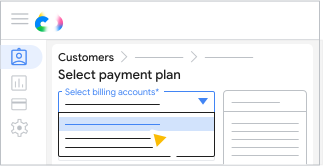
- All customer orders must use the same currency, but you can use different billing accounts with the same currency.
- All Google Workspace subscriptions need to use the same billing account.
- For the payment plan that you want, click Select plan.
- Enter the number of licenses needed
 click Save.
 - (Optional) Enter a P.O. number.
- Click Confirm order Close.
After placing an order
Detailed feature support by language
All Gemini features are available in English. Some AI features are available in other languages, with expanded language support rolling out now and continuing through the rest of 2025. Learn more about language availability.