### 주문 후
* 고객은 서비스 약관에 동의해야 합니다. 서비스 약관에 동의하면 구독 상태가 **정지됨** 에서 **활성** 으로 변경됩니다.
* 신규 고객은 도메인 소유권을 확인해야 합니다.
* 고객이 여러 제품을 사용하는 경우 고객의 자동 라이선스 설정을 검토하세요. [자세히 알아보기](https://support.google.com/cloudidentity/answer/7384684#multiple-services)
### Vault 주문하기
1. [Partner Sales Console](https://channelservices.cloud.google.com){:target="_blank"}에 로그인합니다.
2. 고객 페이지에서 고객의 이름을 클릭합니다.
3. 구독에서 새 서비스를 클릭합니다.
4. 주문 유형을 선택하라는 메시지가 표시되면 Google 주문 구매 를 클릭합니다.
5. **Google Vault** 에서 **선택** 을 클릭합니다.
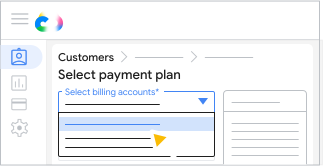
Partner Sales Console에 결제 계정이 여러 개 설정된 경우 결제 계정을 선택합니다.
<ul>
  <li>All customer orders must use the same currency, but you can use different billing accounts with the same currency.</li>
  <li>All Google Workspace subscriptions need to use the same billing account.</li>
[[["이해하기 쉬움","easyToUnderstand","thumb-up"],["문제가 해결됨","solvedMyProblem","thumb-up"],["기타","otherUp","thumb-up"]],[["필요한 정보가 없음","missingTheInformationINeed","thumb-down"],["너무 복잡함/단계 수가 너무 많음","tooComplicatedTooManySteps","thumb-down"],["오래됨","outOfDate","thumb-down"],["번역 문제","translationIssue","thumb-down"],["샘플/코드 문제","samplesCodeIssue","thumb-down"],["기타","otherDown","thumb-down"]],["최종 업데이트: 2026-09-19(UTC)"],[],[]]


 저장 을 클릭합니다.