Google Vault-bestellingen, Google Vault-bestellingen, Google Vault-bestellingen, Google Vault-bestellingen
Stay organized with collections
Save and categorize content based on your preferences.
### Na het plaatsen van een bestelling * Klanten moeten de Servicevoorwaarden accepteren. De abonnementsstatus verandert dan van **Opgeschort** naar **Actief**. * Nieuwe klanten moeten hun domeineigendom verifiëren. * Klanten met meerdere producten moeten hun instellingen voor automatische licenties controleren. [Meer informatie](https://support.google.com/cloudidentity/answer/7384684#multiple-services). ### Order Vault 1. Meld u aan bij de [Partner Sales Console](https://channelservices.cloud.google.com). 2. Klik op de pagina Klanten op de naam van de klant. 3. Klik bij Abonnementen op Nieuwe service . 4. Als u wordt gevraagd een bestellingstype te selecteren, klikt u op Google-bestelling kopen . 5. Klik bij **Google Vault** op **Selecteren**.
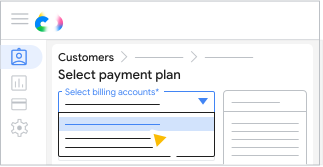
Als u meerdere factureringsaccounts hebt ingesteld in uw Partner Sales Console, selecteert u het gewenste factureringsaccount.
<ul>
  <li>All customer orders must use the same currency, but you can use different billing accounts with the same currency.</li>
  <li>All Google Workspace subscriptions need to use the same billing account.</li>
Klik op 'Selecteer plan' om het gewenste betalingsplan te selecteren.
Voer het aantal benodigde licenties in. Klik op Opslaan .
[[["Easy to understand","easyToUnderstand","thumb-up"],["Solved my problem","solvedMyProblem","thumb-up"],["Other","otherUp","thumb-up"]],[["Missing the information I need","missingTheInformationINeed","thumb-down"],["Too complicated / too many steps","tooComplicatedTooManySteps","thumb-down"],["Out of date","outOfDate","thumb-down"],["Translation issue","translationIssue","thumb-down"],["Samples / code issue","samplesCodeIssue","thumb-down"],["Other","otherDown","thumb-down"]],["Last updated 2026-09-19 UTC."],[],[]]


 Klik op Opslaan .