

Когда администратор покидает вашу организацию, следуйте рекомендациям по удалению его учетной записи администратора, сохраняя при этом безопасность вашей учетной записи Google Workspace.
Для пользователей, имеющих учетную запись администратора и отдельную учетную запись пользователя, можно удалить только учетную запись администратора. Если сотрудник покидает организацию, необходимо удалить обе учетные записи. Подробнее об отзыве прав администратора можно узнать здесь.
Удаление учетной записи администратора
Рекомендуемые шаги для удаления учетной записи администратора и обеспечения безопасности учетной записи Google Workspace вашей организации:
- Приостановить действие учетной записи администратора пользователя .
Пока учетная запись заблокирована, пользователь не может получить доступ к консоли администратора и сервисам Google. - Прежде чем удалить учетную запись, следуйте рекомендациям по обеспечению безопасности данных.
- (Необязательно) В консоли администратора Google просмотрите отчет по администрированию в категории «Аудит» и отфильтруйте данные по имени администратора, чтобы выявить возможные несанкционированные действия. Подробнее
- Удалите у пользователя роль администратора .
- Выполните следующие действия, чтобы удалить учетную запись пользователя из вашей организации .
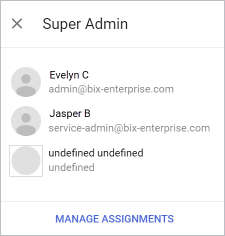
Примечание для учетных записей суперадминистраторов Если вы удаляете учетную запись пользователя, не удаляя его роль суперадминистратора: на странице «Роли» в разделе «Суперадминистратор» > «Просмотр администраторов» старая учетная запись отображается как «не определена». Для удаления неопределенных ролей:
|  |