Connect your cables
Stay organized with collections
Save and categorize content based on your preferences.
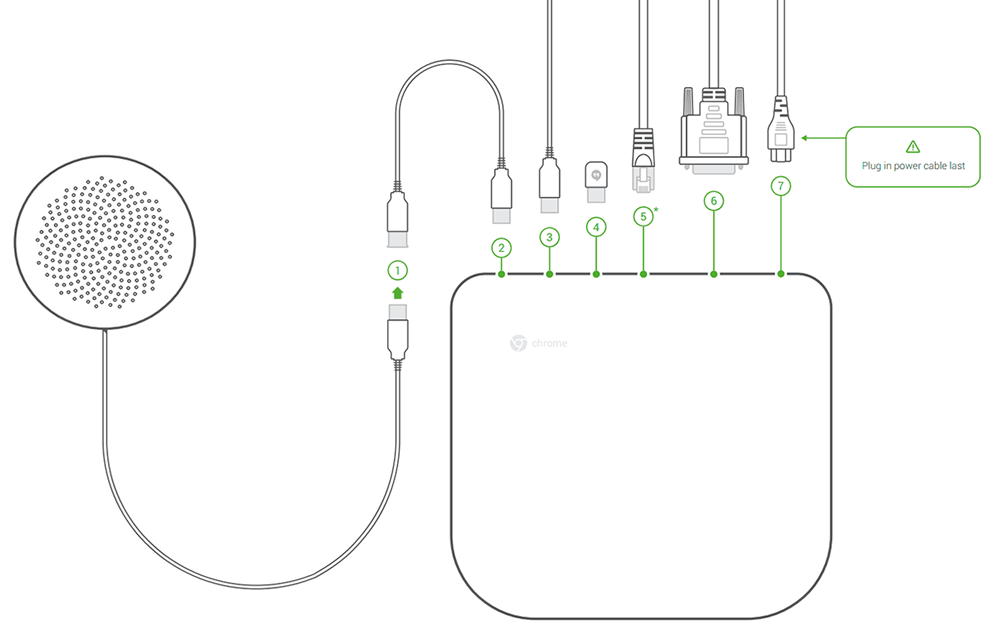
Use the included cables and sensor to connect your Chromebox to the other system components, as follows:
Speaker/microphone—speaker cable
USB extension cable (if needed)
Camera (also with USB extension cable, if needed)
Remote control sensor
Internet—Ethernet cable
Tip: Although you can use your Chromebox for meetings device over a wireless network connection, we recommend using a wired network connection for best sound and video quality.
[[["Easy to understand","easyToUnderstand","thumb-up"],["Solved my problem","solvedMyProblem","thumb-up"],["Other","otherUp","thumb-up"]],[["Missing the information I need","missingTheInformationINeed","thumb-down"],["Too complicated / too many steps","tooComplicatedTooManySteps","thumb-down"],["Out of date","outOfDate","thumb-down"],["Samples / code issue","samplesCodeIssue","thumb-down"],["Other","otherDown","thumb-down"]],["Last updated 2026-10-01 UTC."],[],[]]