
You get your Google Voice invoice in the Google Admin console. Your invoice shows monthly charges that you accrued. If you buy Voice from an authorized Google partner, the partner bills and invoices you.
On this page
- When Voice billing starts
- How your monthly Voice payment is calculated
- View the numbers in your organization
- View your transactions & invoice
- Understand your transactions & invoice
- E911 & 988 related charges
- Paying your invoice
- About payments profile types
- About billing currencies
- Manage your Voice charges
When Voice billing starts
Voice subscriptions are available with a monthly flexible subscription plan. After you sign up for Voice, we charge your primary payment method at the beginning of the next month. If your service starts in May, for example, we charge you at the beginning of June. After that, the billing cycle continues automatically at the beginning of each month.
You're billed for the number of Voice users your organization had per day during the previous month. A prorated payment can happen, for example, if you sign up in the middle of the month or add users during the billing cycle.
How your monthly Voice payment is calculated
Your total monthly charge for a Voice subscription depends on 3 factors:
1. Your Voice subscription
| Monthly payment | Users | |
|---|---|---|
| Google Voice Starter standalone | $10 USD per license. | Available only to a single user with a personal Gmail account that ends in @gmail.com |
| Google Voice Standard standalone | $20 USD per license. | Available only to a single user with a personal Gmail account that ends in @gmail.com |
| Google Voice Starter (add-on) | $10 USD per license. For example, if you have 6 users, you're charged $60 USD each month. | Supports up to 10 users or licenses for small businesses |
| Google Voice Standard (add-on) | $20 USD per license. For example, if you have 25 users, you're charged $500 USD each month. | Supports an unlimited number of users or licenses for regional businesses, for example, European countries |
| Google Voice Premier (add-on) | $30 USD per license. For example, if you have 150 users, you're charged $4,500 USD each month. | Supports an unlimited number of users or licenses for businesses with international offices |
For more details, go to Compare Voice subscriptions.
2. Your number of assigned Voice licenses
Every Voice user needs a license and a phone number. You're charged monthly for the number of Voice licenses you assign to users. The rates are based on the subscription (details earlier on this page). If you set up automatic licensing, users in your organization will automatically get a Voice license and incur monthly charges.
Based on your number of licenses and Google Workspace edition, we also include extra numbers for automated attendants and ring groups. Google does not currently charge for numbers over your quota, but we plan to apply limits and charges in the future. Google will notify you when any changes begin. To prepare for any upcoming limits and charges, if you have unassigned numbers, you should release them. For details, review Release and reclaim a Voice number.
3. Your charges for paid calls
Your organization incurs charges when users make calls to paid destinations.
Most calls from European Voice numbers to European mobile and landline numbers are not subject to domestic and international rates. Most are included in the cost of a Voice license. However, calls to non-standard rate numbers, such as premium rate, shared cost, universal access, and non-geographic numbers, are not included.
For details, review Make international calls with Google Voice.
View the numbers in your organization
You can review the numbers included in your subscription and numbers that incur a monthly fee.
-
In the Google Admin console, go to Menu


 Apps
Google Workspace
Google Voice.
Apps
Google Workspace
Google Voice.Requires the Google Voice Admin role.
- On the side, click Numbers.
- At the top, click Show details.
View your transactions & invoice
-
In the Google Admin console, go to Menu
 Billing
Payment accounts.
Billing
Payment accounts.Requires having the Billing management privilege.
Click the account ID for your subscription.
You can review your current balance at the top of the Payments page.
For Transactions, click View Transactions And Documents.
(Optional) To get a copy of an invoice, click Print
 or Download
  .
.
For more details, go to Check your billing account balance.
Understand your transactions & invoice
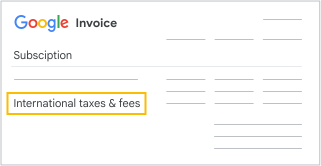
On your invoice, you can review the monthly accrued charges. Along with various transactions, you might have more rates* and fees. You might have charges for:
- Your subscription
- Additional purchased Voice numbers
- Ported phone numbers not included with Voice licenses
- Additional calling minutes and calls to paid destinations
- Taxes and regulatory fees, depending on your location
- Prorated plan fees for a partial month, if you sign up in the middle of a contract period
- Commitment billing fees, credits, and discounts
If your subscription has multiple locations, you get a single invoice with itemized fees, taxes, and regulatory costs associated with each location.
*Rates are subject to change.
E911 & 988 related charges
Important: Google is required by regulation to collect and remit fees to support and finance local governments' operation of emergency calling services (E911) in the U.S. and Canada and the National Suicide Prevention Lifeline (988) in the U.S., even if Voice isn't used to call an emergency service.
Depending on your location, you might be charged a flat fee per Voice number per month. Each number assigned to a user is subject to fees, even if the number was assigned only for a brief period of time.
Additional information might be available from your local telecommunications authority.
Paying your invoice
When you sign up for Voice, you also set up billing. If you don't finish the billing setup, your account can be deactivated. After you set up a payment method, Google automatically processes your Voice payment on the billing date. However, you can make manual payments or pay early.
The exact payment methods you can use depend on the country you select when you set up your Google billing account. For example, direct debit is only available for Voice subscriptions in the U.S. Learn about payment options in my country.
About payments profile types
Applies only to Voice Starter standalone and Voice Standard standalone subscriptions
When you sign up for a Voice Starter standalone or Voice Standard standalone subscription, you choose either Individual or Organization as your payments profile type. Your payments profile type can impact how taxes are calculated and applied to your invoice. For details, go to Create & manage your payments profile.
About billing currencies
- For add-on subscriptions to Workspace, you can make payments in CAD, GBP, EUR, and USD. However, your payments are calculated in U.S. dollars. Depending on the exchange rate, your payment might vary each month. Payments can vary even if the number of users, phone numbers in use, and calls to paid destinations remain the same.
- For Voice Starter standalone subscriptions, you can only make payments in USD.
Manage your Voice charges
- Remove a user—If you remove a user from your Voice subscription, you will no longer be charged for that user. Your bill will reflect a prorated charge for that user.
- Add a user—You can add a user to a Voice add-on subscription at any time, up to the user limits based on your plan. You're only charged for the time the user was part of your plan. If you add the user during the billing cycle, your bill reflects a prorated charge for the user. For details, go to Assign Voice licenses to users.
- Cancel your subscription—You can cancel your Voice subscription at any time. If you cancel in the middle of your contract period, you're only charged for the days prior to your cancellation. For details, go to Cancel your Voice subscription.